
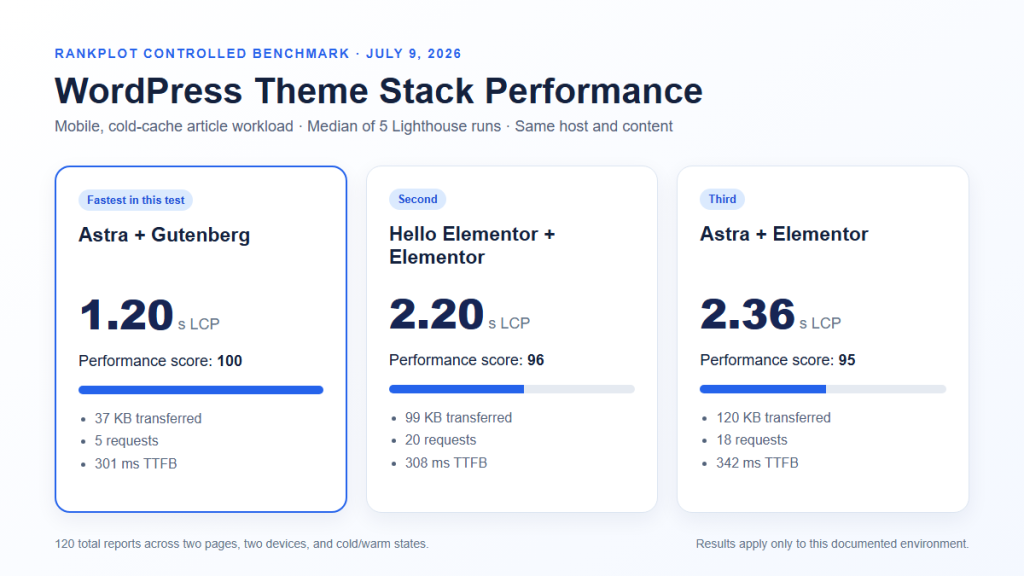
Quick answer: In RankPlot’s controlled Gutenberg vs Elementor performance test under the same Astra theme, Gutenberg had lower median cold-cache LCP in all four mobile and desktop workload comparisons. It also used 5 frontend requests and about 37 KB, compared with 18 requests and about 120 KB for Elementor. Warm-cache LCP results were much closer, and Elementor was 11 ms faster in one mobile article cell. These are lab results for the tested setup, not a rule that Gutenberg is always faster.
Last verified: July 27, 2026. The direct Astra-to-Astra comparison uses 80 valid Lighthouse reports from RankPlot’s broader 120-run WordPress performance dataset. Read how RankPlot tests WordPress products before applying the result to another site.
This comparison answers a narrow question: when the theme, host, content, device profile, and cache condition are held constant, what frontend differences appear between Astra + Gutenberg and Astra + Elementor? It does not measure editor convenience, design capability, real-user INP, conversions, or search rankings.
Gutenberg vs Elementor Performance: Quick Verdict
| Decision | Better fit | Reason | Important qualification |
|---|---|---|---|
| Lean article and content workflows | Gutenberg | It produced fewer requests, lower cold-cache page weight, and lower cold-cache median LCP in this test. | Your blocks, theme, plugins, images, and host can change the result. |
| Visually composed landing pages | Elementor may justify its cost | Its visual controls and widget system can reduce the need for custom development. | Test the finished template rather than assuming the builder alone determines speed. |
| Existing Elementor site | Optimize before rebuilding | A migration can introduce design, content, tracking, and conversion risk. | Warm-cache differences were small in several test cells. |
| New site with simple layouts | Start with Gutenberg | The native block workflow provides a lean baseline with fewer frontend dependencies in this setup. | Confirm that the editing model meets the site’s real layout requirements. |
The practical choice is not “speed at any cost.” Choose the least complex editing stack that can reliably produce and maintain the pages the site needs. For many editorial sites, that can be Gutenberg. For a design-heavy marketing site, Elementor’s additional frontend layer may be an acceptable tradeoff.
What RankPlot Tested
RankPlot ran the controlled benchmark on July 9, 2026. Three isolated WordPress installations used the same host and region. The direct Gutenberg-versus-Elementor comparison keeps Astra as the theme for both stacks. Hello Elementor + Elementor appears in the full dataset as secondary context, but it is not the direct control because changing to Hello Elementor changes both the theme and the builder stack.
| Direct variants | Astra + Gutenberg and Astra + Elementor |
|---|---|
| Direct reports | 80 valid Lighthouse reports |
| Broader dataset | 120 valid reports, including 40 Hello Elementor context reports |
| Workloads | Matching article and conversion pages |
| Devices | Lighthouse mobile and desktop profiles |
| Cache states | Cold and warm |
| Repetitions | Five valid runs per test cell |
| Aggregation | Median, never the best run |
| Tool | Lighthouse through Chrome 149 with simulated throttling |
| Indexing | Test installations used noindex, nofollow, noarchive headers |
The two page workloads
The article workload contained an H1, hero image, table of contents, long-form copy, a comparison table, and an FAQ. The conversion workload contained a hero, CTA, feature sections, a pricing or comparison table, a secondary CTA, and an FAQ. Content and primary assets were matched across the isolated installations.
How cold and warm cache were separated
Cold-cache runs used Lighthouse’s default storage reset. Warm-cache runs primed the origin and retained browser storage for the measured navigation. This distinction matters because a first visit and a repeat visit can expose different costs. Reporting only cold results would exaggerate how large the gap remained after caching; reporting only warm results would hide the heavier first-load path.
All values below are medians from five valid reports in each cell. The complete method, individual run log, and machine-readable aggregates are available in the evidence page.
Cold-Cache Results
Gutenberg had lower median cold-cache LCP in all four direct comparisons. The largest percentage gap appeared on the desktop article workload, while the smallest appeared on the mobile conversion workload. The direction was consistent across both page types and both device profiles in this test.
| Workload | Device | Gutenberg median LCP | Elementor median LCP | Elementor difference |
|---|---|---|---|---|
| Article | Mobile | 1,203 ms | 2,361 ms | +1,157 ms (+96.2%) |
| Article | Desktop | 480 ms | 1,041 ms | +561 ms (+116.8%) |
| Conversion | Mobile | 1,367 ms | 2,370 ms | +1,003 ms (+73.3%) |
| Conversion | Desktop | 512 ms | 1,032 ms | +520 ms (+101.5%) |
Mobile cold-cache result
On the article page, Gutenberg’s median LCP was 1.203 seconds and Elementor’s was 2.361 seconds. On the conversion page, the medians were 1.367 seconds and 2.370 seconds. Both Elementor medians remained under Google’s 2.5-second “good” LCP threshold in this simulated lab profile, but that does not establish a real-user Core Web Vitals pass. Google’s Core Web Vitals guidance is based on real-world experience and evaluates the 75th percentile.
Desktop cold-cache result
The desktop gaps were 561 ms for the article and 520 ms for the conversion page. Those differences are meaningful inside this controlled experiment, but they are not a prediction for every production page. A large hero image, web fonts, a consent platform, analytics, ads, forms, or different caching could become the dominant cost on another site.
Warm-Cache Results Were Much Closer
Warm-cache medians narrow the decision. Gutenberg remained ahead in three of four cells, but the absolute gaps were only 6 to 82 ms. Elementor was 11 ms faster on the mobile article workload. That exception is important: it shows why the conclusion must describe the tested cells instead of turning the cold-cache pattern into a universal rule.
| Workload | Device | Gutenberg median LCP | Elementor median LCP | Elementor difference |
|---|---|---|---|---|
| Article | Mobile | 980 ms | 969 ms | -11 ms (-1.1%) |
| Article | Desktop | 268 ms | 274 ms | +6 ms (+2.4%) |
| Conversion | Mobile | 943 ms | 1,025 ms | +82 ms (+8.7%) |
| Conversion | Desktop | 272 ms | 289 ms | +17 ms (+6.3%) |
Caching did not make the stacks identical. Elementor still produced more requests, and the warm conversion cells retained a small LCP gap. But the user-visible meaning of an 11 ms, 17 ms, or even 82 ms lab difference is not the same as a one-second cold-cache gap. Site owners should consider both first-load and repeat-load behavior.
Requests and Page Weight Explain Part of the Gap
The direct stacks rendered matching workloads, but their frontend resource profiles differed. Astra + Gutenberg used 5 requests in every measured cell. Astra + Elementor used 18. Cold-cache median resource bytes were about 37 KB for Gutenberg and about 120 KB for Elementor. In the warm-cache cells, the medians were about 18 KB and 20 KB.
| Condition | Astra + Gutenberg | Astra + Elementor | Observed difference |
|---|---|---|---|
| Requests | 5 | 18 | Elementor issued 13 more requests |
| Cold-cache resource bytes | About 37 KB | About 120 KB | Elementor transferred about 83 KB more |
| Warm-cache resource bytes | About 18 KB | About 20 KB | The transferred-byte gap became small |
| Frontend capability represented | Native block-based content | Visual builder runtime and widget system | The additional layer can support a different editing and design workflow |
Request count and bytes help explain the cold-cache result, but they do not prove causation by themselves. Request priority, CSS delivery, server response, rendering order, and the LCP element also affect when the page becomes visible. A smaller page can still be slow if a critical resource is discovered late, and a larger page can perform well when its critical path is managed carefully.
Why Elementor can still be the right tool
Elementor’s additional frontend layer accompanies a visual composition system, responsive controls, widgets, templates, and workflow choices that Gutenberg does not reproduce in exactly the same way. Elementor also maintains official performance features for areas such as image loading, background-image lazy loading, font icons, and element caching. Whether those capabilities justify the extra layer depends on the finished page and the team maintaining it.
How to Choose Between Gutenberg and Elementor
Choose Gutenberg when the content model fits
- The site is primarily articles, documentation, reviews, or repeatable content templates.
- The required layouts can be built with core blocks, patterns, theme controls, and a small number of carefully selected block extensions.
- The team values a lean baseline and is comfortable working within the block editor’s layout model.
- You are starting a new project and do not need a builder-specific template library.
The WordPress block editor, often called Gutenberg, is the native editing system for modern WordPress. Native does not automatically mean fast: themes, block plugins, fonts, images, and custom code can still create heavy pages. It does mean you can begin without adding a separate page-builder runtime.
Choose Elementor when its workflow earns the cost
- The site requires visually composed landing pages that change frequently.
- Non-developers need detailed responsive controls and a broad widget system.
- Existing templates, forms, popups, or design workflows already depend on Elementor.
- A controlled test of the finished page meets the site’s performance budget.
Do not choose Elementor because a demo looks polished, and do not reject it because a generic benchmark shows more requests. Build the representative template, configure caching, optimize its real LCP asset, and test it on the intended hosting stack. The decision should include maintenance time and design requirements as well as frontend metrics.
For an existing Elementor site, optimize before migrating
Rebuilding every page in Gutenberg can change HTML structure, styling, forms, event tracking, internal links, and conversion paths. Begin with the current bottleneck. Remove unused widgets and third-party scripts, simplify the heaviest templates, optimize the LCP element, confirm page caching, and test Elementor’s supported performance settings. Use RankPlot’s WordPress performance optimization workflow to measure changes one variable at a time.
What This Benchmark Does Not Prove
The controlled design improves comparability, but it narrows the conclusion. The following claims are outside the evidence:
- Gutenberg is always faster than Elementor.
- Every Elementor page fails Core Web Vitals.
- A Lighthouse result proves an SEO ranking change.
- The faster lab stack increases traffic, conversions, revenue, or engagement.
- Fewer requests automatically produce a better user experience.
- The test measured editor responsiveness or publishing productivity.
- Hello Elementor isolates an Elementor-only effect when compared with Astra + Gutenberg.
Lab LCP is not CrUX field LCP
Lighthouse uses a controlled lab profile. Chrome User Experience Report data reflects eligible real visits over time. Real visitors bring different phones, networks, locations, cookies, cache histories, consent choices, and interaction patterns. Use the lab test to compare controlled changes and diagnose causes; use field data to understand the experience your traffic actually receives.
The test covers two controlled templates, not every site type
The workloads did not include WooCommerce, advertising, analytics suites, consent platforms, complex forms, membership features, logged-in visitors, or large third-party embeds. The results also belong to the tested software versions, host, cache configuration, and date. A future major change to WordPress, Astra, Elementor, Lighthouse, PHP, or caching can justify a new dated benchmark.
How to Test Gutenberg vs Elementor on Your Site
- Choose representative templates. Include a normal article and the most important conversion-oriented page.
- Clone the environment. Use the same host, region, WordPress version, theme, plugins, images, fonts, header, footer, and cache configuration.
- Change only the editor stack. Do not compare a minimal Gutenberg article with a feature-heavy Elementor landing page.
- Disable indexing on the test copies. Prevent duplicate pages from entering search.
- Test mobile and desktop. Keep device and throttling profiles fixed.
- Separate cold and warm cache. Record how a first navigation and a primed navigation behave.
- Run each cell several times. Use medians rather than selecting the best score.
- Record more than LCP. Keep TTFB, FCP, CLS, TBT, Speed Index, bytes, requests, and raw reports.
- Check functionality. A faster page is not an improvement if forms, tracking, navigation, or layout breaks.
- Monitor field data after deployment. Lab improvement does not guarantee the same change in real-user data.
Keep the test small enough to reproduce. If several plugins, the theme, the builder, and the server change together, the result cannot identify which change mattered.
Frequently Asked Questions
Is Gutenberg faster than Elementor?
Gutenberg was faster in all four cold-cache LCP cells in RankPlot’s controlled Astra-to-Astra comparison. Warm-cache results were closer, and Elementor was 11 ms faster in the mobile article cell. The result applies to the tested pages and environment; it does not prove Gutenberg wins on every site.
Does Elementor fail Core Web Vitals?
Not necessarily. Core Web Vitals are based on real-user field data, and a site’s outcome depends on its templates, content, host, cache, images, fonts, plugins, and third parties. In this lab test, Elementor’s median mobile cold-cache LCP was 2.361 seconds for the article and 2.370 seconds for the conversion page, but those values are not a CrUX assessment.
Why were the warm-cache results so close?
After priming, fewer bytes needed to transfer: about 18 KB for Gutenberg and about 20 KB for Elementor in the direct comparison. The browser and origin could reuse cached resources. Request count still differed, but the cold-cache transfer gap was no longer present at the same scale.
Is Hello Elementor faster than Astra with Elementor?
Hello Elementor had lower median LCP than Astra + Elementor in several cells in the broader dataset. That is a theme-plus-builder comparison, not a Gutenberg-versus-Elementor control. Use the full 120-run dataset or the separate Astra-versus-Hello analysis for that question.
Should I rebuild an Elementor site in Gutenberg?
Not from this benchmark alone. Measure the current production templates, identify the bottleneck, and estimate migration risk. Optimize the existing site first. Rebuild only when the expected performance and maintenance benefits justify the design, content, tracking, QA, and redirect work.
Does using Gutenberg improve SEO?
The benchmark does not test rankings. A leaner page can make performance work easier, but SEO also depends on content quality, crawlability, indexing, internal links, structured data, relevance, and real-user experience. Do not convert the measured LCP difference into an unsupported ranking claim.
What is the best way to speed up Elementor?
Measure the finished template, identify its LCP element and critical request chain, confirm full-page caching, optimize images and fonts, remove unnecessary widgets and third-party scripts, and test supported Elementor performance features one at a time. Retest several times and verify forms and responsive layouts after every meaningful change.
Sources and Raw Data
- RankPlot WordPress Theme Speed Test Data 2026
- Download all 120 Lighthouse runs in CSV
- Download aggregate medians in JSON
- How RankPlot Tests WordPress Products
- WordPress Block Editor documentation
- Elementor performance features
- Google Search Central: Core Web Vitals
Bottom line: Gutenberg provided the leaner cold-cache frontend and lower median cold-cache LCP in RankPlot’s direct test. Elementor’s warm-cache results were competitive, including one 11 ms win. Use the data as a controlled starting point, then test the actual pages, workflow, and constraints of the site you are building.