
Disclosure: This post contains affiliate links. If you buy through them, I may earn a commission at no extra cost to you. I only recommend products I’d actually use. My opinions are my own.
This Ahrefs review covers everything you need to know about the tool in 2026 — from pricing and features to real ROI — so you can decide if it’s worth your money.
⚡ QUICK VERDICT
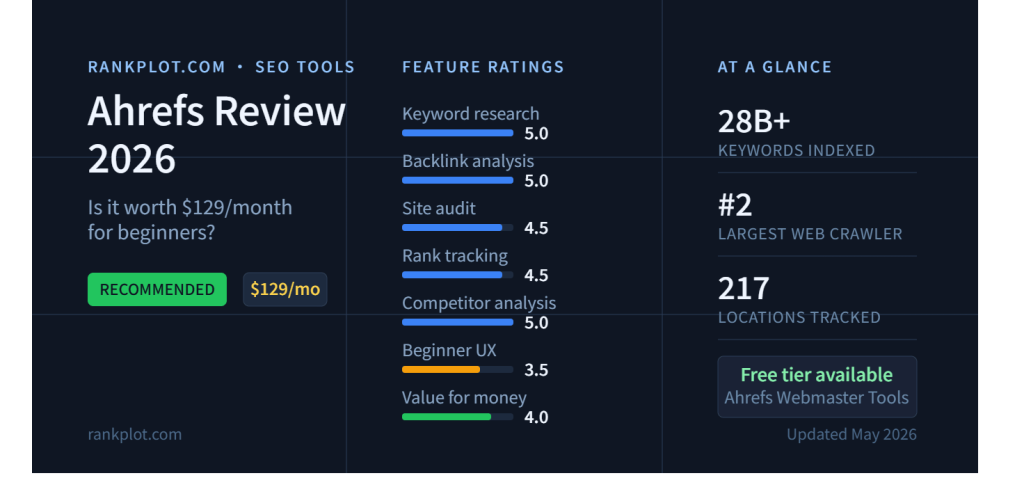
Ahrefs is the strongest pure-organic SEO tool money can buy in 2026 — but $129/month is dead money if you don’t yet know what to do with the data it gives you.
⭐⭐⭐⭐⭐ Keyword Research
⭐⭐⭐⭐⭐ Backlink Analysis
⭐⭐⭐⭐½ Site Audit
⭐⭐⭐⭐½ Rank Tracking
⭐⭐⭐⭐⭐ Competitor Analysis
⭐⭐⭐ Content Tools
⭐⭐⭐½ Beginner UX
⭐⭐⭐⭐ Value for Money
Starting price: $29/mo (Starter) | $129/mo (Lite, the real entry point)
Free option: Ahrefs Webmaster Tools — no credit card, no expiry
Free trial: ❌ Removed in 2022, not reinstated
Table of Contents
I’ll cut right to it: Ahrefs at $129/month isn’t the right call for every beginner. For some of you, it’ll pay for itself in 60 days. For others, you’ll cancel after month two wondering what you even paid for. The difference isn’t the tool — it’s whether you’re at the right stage to use it.
I run Rankplot, an affiliate review site in the hosting and SEO tools space. No agency clients, no team — just me, building in public. Ahrefs has been my primary research layer since day one. So when I say this review comes from actual use, I mean it: I’ve hit the credit ceilings, stress-tested the keyword data against real SERPs, and figured out the hard way which features matter at which stage of growth.
What I’ll cover: the real pricing (including costs most reviews skip), how the credit system burns in a live research workflow, which features you’ll actually open on week one vs. month six, the math on whether $129 makes financial sense for your site right now, and a straight verdict with no hedging.
What Is Ahrefs, and Who Actually Uses It?
Ahrefs started as a backlink tool in 2011. That DNA is still the whole ballgame. Its web crawler is the second largest on the planet after Google — which means when you pull a site’s backlink profile in Ahrefs, you’re looking at data as close to reality as anything outside Google Search Console itself. The keyword research, site audit, rank tracking, and content tools came later. Good additions, all of them. But backlinks are still why professionals keep renewing.
The core user base: SEO consultants, content-led startups, serious affiliate publishers, and agencies running multiple client domains. Beginners do sign up — plenty of them — but a lot churn out after month one. Not because the tool is bad. Because they hadn’t figured out which specific workflows justified the spend. That’s the gap this review fills.
Ahrefs vs. Semrush: The 30-Second Version
“Which one should I get?” That’s the question I see more than any other. Here’s the short version: Ahrefs does fewer things than Semrush, but does those things at a higher level. Semrush is the Swiss Army knife — PPC intelligence, content tools, social tracking, local SEO, all under one roof. Ahrefs stays in its lane: organic keyword research and backlink analysis, executed better than anyone else at this price. If that lane is where you live, Ahrefs wins. If you need the full marketing stack, Semrush is the smarter buy. Full comparison coming in our Semrush vs. Ahrefs head-to-head.
The Free Option You Should Know About First
Before you pull out a credit card: Ahrefs Webmaster Tools (AWT) costs nothing, and it’s not a stripped-down demo. Verify ownership of a domain and you get real backlink data, organic keyword reporting, and Site Audit access — the same underlying data engine as the paid plans. What it won’t do: competitor research, Keywords Explorer, rank tracking on sites you don’t own. If you’re in month one of building a site and mostly trying to understand your own baseline, AWT gets you there for free. Start there. Upgrade when you can articulate what’s missing.
Ahrefs Pricing in 2026: The Full Picture Before You Commit
Quick context on pricing history: Ahrefs jacked up rates roughly 30% in 2023 — Lite went from $99 to $129/month overnight. Then in January 2026, they introduced the Starter plan at $29/month, which was a smart move to stop losing beginners to Semrush’s free trial. Here’s where things stand now:
| Plan | Monthly | Annual/mo | Credits/mo | Best For |
|---|---|---|---|---|
| Starter | $29 | N/A | 100 | Occasional spot-checks only |
| Lite | $129 | ~$108 | 1,000 | Solo bloggers, active SEO |
| Standard | $249 | ~$208 | Unlimited | Agencies, content teams |
| Advanced | $449 | ~$374 | Unlimited | Large agencies, in-house teams |
| Enterprise | Custom | Custom | Unlimited | API-heavy enterprise ops |
Starter ($29/month) — What It Actually Unlocks
On paper: Site Explorer, Keywords Explorer, Site Audit, all for $29. Sounds like a deal. In practice, the credit ceiling turns this into a very limited instrument. Here’s the actual fine print:
🟠 STARTER PLAN — THE REAL LIMITS
- 100 credits/month total. Every report you load or filter you apply eats one credit. I’ll show you in the next section exactly how fast that runs dry.
- 1 month of historical data only. Can’t track Google update recovery, catch trend shifts, or benchmark year-over-year. That data just isn’t there.
- No rank tracking. Keyword position monitoring doesn’t exist on this plan — period.
- 1 project only. One domain. If you have two sites, you’re picking one.
- Hard cap, no workarounds. You can’t buy extra credits or add seats on Starter. When you’re out, you wait for next month.
Real talk: Starter makes sense for one specific use case — “I want to poke around a competitor’s top pages once or twice a month before I’m ready to commit to $129.” That’s it. For any real publishing workflow, you’ll burn through 100 credits in a single afternoon. More on that math shortly.
Lite ($129/month) — The Real Entry Point for Serious Work
This is where Ahrefs stops being a toy and starts being a tool. The gap between Starter and Lite is not incremental — it’s the difference between occasionally glancing at data and actually running your content operation off it:
✅ WHAT YOU GET ON LITE
- 1,000 credits/month (unverified sites)
- +500 bonus credits for your verified domain
- 5 projects
- 750 tracked keywords in Rank Tracker
- 6 months of historical data
- 100,000 pages/month crawl limit
- Full Keywords Explorer + Site Explorer + Site Audit
- Ahrefs MCP (use Ahrefs data inside Claude/ChatGPT)
❌ WHAT’S NOT ON LITE
- Content Explorer (Standard+ only)
- Keyword clustering
- Search intent analysis
- SERP update tracking
- Batch analysis across 1,000 domains
- Portfolios (group URL monitoring)
Standard ($249/month) — When You’ll Need to Upgrade
Standard kills the credit cap entirely — unlimited fair usage across the board. You also unlock Content Explorer, which is where serious link-building prospecting happens, plus keyword clustering and search intent analysis. If you’re a beginner just getting your first 30 articles live? You don’t need this yet. The upgrade signal is simple: you’re consistently running out of Lite credits before the month ends, or link building has become a big enough part of your workflow that Content Explorer is a bottleneck.
The Hidden Costs Nobody Talks About
⚠️ READ THIS BEFORE YOU SUBSCRIBE
- Extra seats run $40/user/month on Lite and Standard. Bring a VA or a freelancer into your workspace and your effective monthly cost jumps fast.
- AI features are separate line items entirely. Brand Radar — which tracks your brand mentions in Google AI Overviews — starts at $199/month per index. The AI Content Helper is another $99/month. Neither is included in any base plan.
- Zero free trial. Ahrefs pulled the $7 seven-day trial in 2022 and never brought it back. Day one is full-price, no exceptions.
- Annual billing saves about 17% — but Starter is monthly-only, full stop. And annual plans generally don’t refund. Start monthly on Lite before you lock in a year.
The Credit System — The Thing Nobody Explains Properly
This is where most beginners get blindsided. They sign up for Lite, run a few research sessions, check their usage mid-month, and go: “Wait, I’ve already used 800 of my 1,000 credits?” Here’s why that happens and how to work around it.
How Credits Actually Work
On Starter and Lite, one credit gets spent every time you load a report or change a filter in Site Explorer, Keywords Explorer, or Content Explorer. Not per session. Not per day. Per report load. So: enter a keyword in Keywords Explorer — that’s a credit. Filter results by keyword difficulty — another credit. Filter again by search volume — another. Three credits before you’ve even decided if the keyword is worth targeting. Rank Tracker and Site Audit have their own separate usage pools and don’t touch your credits at all.
A Realistic Beginner Session: How Fast Do Credits Burn?
I mapped out a typical beginner research session — one keyword cluster, one competitor — step by step:
| Action | Credits Used |
|---|---|
| Open Keywords Explorer, enter seed keyword, load results | 1 |
| Apply keyword difficulty filter (<30) | 1 |
| Apply search volume filter (100–1,000/mo) | 1 |
| Click one keyword to see its full SERP overview | 1 |
| Open Site Explorer on a competitor domain | 1 |
| Check their Top Organic Pages report | 1 |
| Filter those pages by traffic (highest first) | 1 |
| Total — ~20 minutes, one keyword cluster | 7 credits |
Seven credits for twenty minutes of light research. Scale that up to a two-hour session across three keyword clusters and two competitors, and you’re looking at 50–80 credits gone. Do that twice in one month and your Lite allowance for unverified sites is gone before you’ve touched rank tracking or your site audit.
The adjustment: Lite forces you to research with intention. Don’t open Ahrefs to “browse around.” Open it with a specific keyword in mind, run your queries, get your answer, close it. That’s a different mental model than Standard’s unlimited plan — and it takes a week or two to adapt to.
The Verified Domain Trick: 500 Extra Credits for Free
💡 DO THIS ON DAY ONE
Connect your domain to Google Search Console and verify ownership in Ahrefs. That single step unlocks 500 additional credits/month earmarked specifically for your verified site, plus 5,000 extra crawl credits for Site Audit. On Lite, that takes your effective monthly research budget from 1,000 to 1,500 credits — a 50% jump, completely free. Most beginners skip this step entirely. Don’t be most beginners.
Core Features Tested: What a Beginner Actually Uses
Keywords Explorer — The Tool You’ll Live In
28+ billion keywords. 217 locations. Those are the headline numbers, but the reason Keywords Explorer earns its reputation is the quality of the scoring — not the size of the database. Two metrics in particular:
Keyword Difficulty (KD) is widely regarded as the most accurate in the industry. I’ve cross-checked Ahrefs’ KD scores against actual SERPs hundreds of times at this point — they hold up. When Ahrefs says KD 20, you can actually rank for that keyword at a modest DR. When Semrush’s equivalent metric says 35, sometimes the SERP is full of DR 80+ domains. That miscalibration costs beginners months of wasted effort chasing keywords they can’t win.
Traffic Potential is even more useful than raw search volume, and most beginners walk right past it. Instead of showing how many searches a specific phrase gets, Traffic Potential estimates how much total organic traffic a page ranking #1 for that topic could pull in — factoring in all the related variants people search alongside the main keyword. That’s the real opportunity size. A keyword with 500 monthly searches might have a Traffic Potential of 4,000. That changes the prioritization completely.
One more thing worth calling out for 2026 specifically: Ahrefs shows click data alongside search volume. A lot of queries now return zero-click results — Google surfaces the answer directly in an AI Overview or featured snippet, and nobody visits the underlying page. Targeting those keywords is a trap. Ahrefs lets you filter them out before you waste time writing the article.
Beginner-friendliness: 7/10. The interface is clean. But there are a lot of metrics, and it takes a week or two before you know which ones to actually act on.
Site Explorer — Competitor Intelligence That Pays Off Fast
Type in any domain. Get a full breakdown of organic traffic, top-ranking keywords, backlink profile, and best-performing content. This is the feature that makes competitive niches navigable. Without it, you’re guessing at what to write. With it, you can see exactly what a top competitor ranks for, find the gaps in their coverage, and target those gaps with content you know has demand.
Backlinks update every 15–30 minutes in Ahrefs — faster than any competing tool at this price. For link builders, that near-real-time refresh matters: you catch new link opportunities and spot lost links before they compound into a rankings problem.
If you’re just starting out: don’t try to absorb everything Site Explorer shows you. Pull two reports — “Top Pages” sorted by organic traffic, and “Organic Keywords.” Those two views cover 80% of what you need to understand about any competitor. Master those before you go deeper.
Site Audit — Technical SEO Without Needing a Dev
Site Audit crawls your whole site and buckets every issue by severity: errors, warnings, notices. Broken links, missing meta tags, noindex flags blocking pages from Google, orphaned content that gets no internal link juice, redirect chains slowing your crawl budget. The report is organized well enough that a non-technical person can actually act on it without a developer.
Here’s a concrete example of what this catches: in one test I ran, Site Audit flagged a noindex tag on six posts — pages that had been live for months but completely invisible to Google because of a stray tag. Competing tools missed it entirely, or buried it so deep in a list of 1,400 “issues” it was effectively invisible. That one find — six deindexed posts, now ranking — more than justified a month’s subscription.
Lite gives you 100,000 crawl credits/month. That covers any site under ~10,000 pages with room to spare. And if you’re still sorting out your WordPress infrastructure, our WordPress hosting guide covers the server-side stuff that affects how Google crawls your site — things no SEO tool can patch for you.
Rank Tracker — Reliable. Not Flashy. Gets the Job Done.
Ahrefs’ rank tracking is accurate. Clean position history charts, clear trend lines, easy filtering. On Lite you can track 750 keywords — that’s 15 keywords per article if you’re running a 50-post site, which is plenty for a focused content operation. Updates are frequent enough to catch real ranking movements versus normal daily SERP noise.
One use case that doesn’t get talked about enough: rank tracking catches keyword cannibalization. Two of your pages fighting over the same query, splitting authority instead of consolidating it — that shows up clearly when you’re watching position history for both URLs. I caught exactly that on Rankplot early, four posts splitting traffic on overlapping keyword clusters. Fixing the internal link structure and merging two of them moved the needle fast. You can’t see that problem without a rank tracker surfacing it.
Ahrefs MCP — The 2026 Workflow Nobody Is Talking About
Ahrefs Lite includes MCP integration — which means you can pipe Ahrefs data directly into AI assistants like Claude or ChatGPT without leaving the tab you’re working in. Ask your AI assistant for the keyword difficulty on a specific phrase, pull a domain’s backlink count, surface a site’s top-traffic pages. All of it, without switching back to the Ahrefs interface and burning a credit on a manual report.
For solo operators running their content operation primarily through an AI writing workflow — which describes a lot of people building sites in 2026 — this is actually a significant quality-of-life feature. Research and production stay in one environment instead of ten browser tabs. Every other Ahrefs review either ignores this entirely or lists it as a one-line bullet point. It’s worth more than that.
The ROI Math: When Does $129/Month Actually Pay for Itself?
“Worth it if you’re serious about SEO” — I’ve read that line in fifteen competing reviews. It says nothing. Here’s the actual math, using affiliate publishing as the benchmark because that’s the most common use case for the beginner reading this.
📊 SCENARIO: AFFILIATE SITE, FIRST 90 DAYS ON LITE
Assumptions:
→ Average affiliate commission: $40/conversion
→ Ahrefs surfaces 3 low-KD commercial keywords your competitors missed
→ Each article lands at position #3–5 and pulls ~150–200 organic visitors/month
→ Conversion rate: 1%
The math:
→ 3 keywords × 175 visitors = 525 organic visitors/month
→ 525 × 1% = ~5 conversions
→ 5 × $40 = $200/month new revenue
→ Subscription cost: $129/month
→ Net: +$71/month. ROI: 55%.
These numbers are on the conservative side. Push those articles to top 3 instead of top 5 and traffic roughly doubles. If your commission is $80 instead of $40, you’re breaking even on a single article. The specific figures aren’t the point — the framework is. Ahrefs needs to help you find 3–5 keywords you would have missed otherwise, in a niche where those keywords drive conversions. If your niche can’t produce that output, the tool isn’t your problem.
The Breakeven Signal: How to Know Before You Subscribe
Here’s a free test you can run right now before spending anything. Open Ahrefs Webmaster Tools (free, no card needed) and look at which keywords your site currently ranks for in positions 6–20. If you see a real cluster of keywords sitting in that “page one, lower half” zone with meaningful search volume — Ahrefs Lite can tell you exactly what’s holding you back from top 5 and what it would take to close that gap. That’s the ROI signal. If AWT shows almost nothing, your site probably needs more content volume before an SEO tool generates meaningful lift. Sequence matters.
Ahrefs vs. Semrush for Beginners: The Honest Comparison
I’ve run both tools side by side on real research tasks — not just feature-compared them on a spec sheet. Here’s what the gap actually looks like for a beginner-to-intermediate user, not an agency.
✅ AHREFS WINS ON
- Backlink data quality and refresh speed — nothing at this price tier comes close
- Keyword difficulty calibration — KD scores map to actual SERPs; Semrush’s equivalent sometimes overstates difficulty for low-competition keywords
- Traffic Potential — no direct Semrush equivalent that’s as useful for topic-level prioritization
- Interface clarity — less cluttered, faster to navigate day-to-day
- MCP integration — Ahrefs data natively inside your AI tools; Semrush has nothing comparable yet
✅ SEMRUSH WINS ON
- Free trial — 7 days, full-feature access. Ahrefs has nothing like this.
- PPC and paid search intelligence — if you run paid campaigns alongside SEO, Semrush bundles all of it
- Built-in content tools — content briefs, writing assistance, SEO templates. Ahrefs charges extra for equivalents.
- Platform breadth — social monitoring, local SEO, PR, all under one subscription
- Onboarding — Semrush guides new users through setup; Ahrefs drops you in and expects you to figure it out
The One Scenario Where Neither Tool Is the Right Call
You haven’t proven organic search is your traffic channel yet. You’re still in month two, three articles live, trying to figure out if SEO is even the right lever for your business. In that case, neither Ahrefs nor Semrush is the right first investment. Use AWT and Google Search Console — both free — and publish for 60–90 days. Once organic data starts moving, you’ll know exactly which features you’re missing. A $129/month tool is only worth it when the person using it knows what to ask it. If you’re still figuring out what questions to ask, wait.
We’ll do a proper data-driven comparison — keyword accuracy tests, backlink coverage side-by-side, real research scenarios — in the Semrush vs. Ahrefs head-to-head.
Ahrefs in the AI Search Era: What It Can’t Do (Yet)
Every SEO forum right now has a version of this thread: “AI Overviews are cannibalizing my traffic and ChatGPT is sending clicks somewhere else. Does Ahrefs even help with that?” Fair question. Honest answer: yes and no, and the line falls exactly where you’d expect — the basic stuff is covered, the advanced stuff costs extra.
Ahrefs added AI Overview tracking in 2025. You can see which of your target keywords now trigger an AI Overview in Google SERPs, and whether your content gets cited in that overview. That’s baked into standard plans and it’s genuinely useful — you can start optimizing your content specifically for AI Overview inclusion rather than just traditional blue-link rankings.
What Ahrefs does not do on a standard Lite or Standard subscription: track your brand mentions across ChatGPT, Gemini, or Perplexity. For that you need the Brand Radar add-on, which starts at $199/month per index, bolted onto your base subscription. The AI Content Helper — for detecting AI-generated content on your pages — is another $99/month on top. These are real costs that most beginner-facing reviews don’t mention because they make the total price look less appealing.
For the majority of beginners building affiliate or content sites in 2026: Google organic is still your primary channel, and Ahrefs covers that completely. If AI citation tracking is a genuine business need for you, you’re probably operating at a scale where the add-on costs aren’t the gating factor anyway.
Ahrefs AI coverage at a glance — 2026:
✅ Google AI Overview detection (which queries trigger it, whether you’re cited) — standard plans
✅ AI content detection on your pages — via Project Boost Max add-on
❌ ChatGPT brand mention tracking — Brand Radar add-on, $199/mo/index
❌ Gemini / Perplexity citation monitoring — same add-on requirement
❌ Native AI content generation or brief tools — AI Content Helper add-on, $99/mo
When to Upgrade: The 3 Signals That Tell You It’s Time
Every Ahrefs review says “start with Webmaster Tools, upgrade when you’re ready.” None of them say what “ready” looks like. Here’s the concrete version:
🔁 Free → Starter ($29)
You’ve gotten your AWT baseline, you understand your own site’s organic footprint, and now you need competitor data — their keyword rankings, their backlink sources, their top content. AWT is a one-way mirror. Starter opens the other side.
🔁 Starter → Lite ($129)
You’re publishing 4+ articles per month and keyword research is a weekly task, not a monthly one. You need rank tracking. Or you’re burning through Starter’s 100 credits before month end. Any one of these is the signal. All three means you should have upgraded last month.
🔁 Lite → Standard ($249)
You’re hitting the 1,000-credit ceiling regularly, link building at scale is now a real workflow, and Content Explorer has become a bottleneck. One of these: hold off. Two or more simultaneously: upgrade now, the math works.
My Verdict: Who Should Buy Ahrefs in 2026?
I’ve run Rankplot on Ahrefs since the site launched. Hit the credit ceilings, worked around them, done the ROI math against real affiliate revenue. Here’s my call, with no hedging:
✅ Buy Ahrefs Lite ($129/mo) if:
- You’re publishing 4–6+ pieces per month and every article starts with a keyword research session
- You’re competing in a niche where knowing exactly why someone outranks you is the whole game
- You need rank tracking — on your own site or a handful of client sites
- Your site already has some organic traction and you want to systematically build on it
- Link building is on your roadmap — even at a beginner level, the backlink data here is in a different class
🔰 Buy Ahrefs Starter ($29/mo) if:
- You want to poke around the interface before putting $129/month on the table
- You only need to check on a competitor once or twice a month — not as a weekly research tool
- Your site has fewer than 20 published pages and you’re not yet on a consistent publishing schedule
⚠️ Starter is a taste test, not a real operational tool. Budget 60 days before you outgrow it.
⏳ Start free (Ahrefs Webmaster Tools) if:
- You’re pre-revenue and haven’t validated organic as your channel yet
- You don’t yet have a firm grasp on what keyword difficulty or domain rating actually mean in practice
- You’re still getting your site’s foundations in order — check our web hosting guide before investing in tracking tools
❌ Skip Ahrefs (for now) if:
- PPC is part of your scope — Semrush handles paid search; Ahrefs doesn’t touch it
- You need to test drive before committing — Semrush gives you 7 days free; Ahrefs won’t
- Organic hasn’t proven itself as a channel yet and your budget is tight — don’t pay for attribution before you have anything to attribute
Last thing: if you’re running Rank Math for on-page SEO — which I do — Ahrefs sits cleanly alongside it. Rank Math handles what goes on your pages. Ahrefs tells you which pages to build and what the competitive landscape looks like. They cover different problems. They don’t step on each other. For a solo operator running a content-first site, that’s the stack I’d rebuild from scratch.
FAQ
Does Ahrefs offer a free trial in 2026?
No. The $7 seven-day trial got cut in 2022 and hasn’t come back. Your best free option is Ahrefs Webmaster Tools — no cost, no expiry, no credit card. It’s limited to verified domains you own, but it runs on the same data engine as the paid plans. If you specifically need competitor research access before committing, Semrush offers a 7-day trial on its paid plans.
Is Ahrefs good for beginners?
Depends entirely on what stage you’re at. Got 20+ articles live, understand basic on-page SEO, ready to let data drive your content decisions? Ahrefs Lite makes sense. Still writing your first five posts and figuring out your hosting stack? You’re not in a position to extract full value from it yet — the tool will collect dust and you’ll cancel. Start with AWT, build some organic history, then upgrade once you know which specific things you’re trying to solve.
What’s the difference between Ahrefs Starter and Lite?
A lot more than the $100/month price difference might suggest. Starter: 100 credits/month, 1 project, zero rank tracking, one month of historical data. Lite: 1,000 credits/month on unverified sites plus 500 bonus for your own verified domain, 5 projects, full rank tracking for 750 keywords, 6 months of historical data, and the Ahrefs MCP integration. Starter is a taster. Lite is where actual SEO work happens.
Can I cancel Ahrefs anytime?
Monthly plans: yes, cancel whenever, access runs to the end of the billing period. Annual plans: generally non-refundable, so don’t commit to a year until you’ve validated the workflow on monthly. Starter is monthly-only by design — there’s no annual option for it. First-timers should always start on monthly Lite before locking in annual billing.
How does the Ahrefs credit system work?
One credit down every time you load a report or apply a filter in Site Explorer, Keywords Explorer, or Content Explorer. Rank Tracker and Site Audit run on their own separate limits — they don’t touch your credits. Starter gets 100/month; Lite gets 1,000 for unverified sites. Standard and above: unlimited. Credits reset on your billing date and don’t carry over. See the credit math table earlier in this review for what a typical session actually costs.
Is Ahrefs better than Semrush for affiliate sites?
For the core affiliate workflow — hunting low-competition commercial keywords, reverse-engineering competitor content strategies, analyzing backlink opportunities — Ahrefs has better data. If you also run paid campaigns to supplement organic, Semrush covers that and Ahrefs doesn’t. For pure organic affiliate operations, most experienced publishers I know reach for Ahrefs first.
Can Ahrefs track AI Overview and ChatGPT mentions?
Google AI Overviews: yes, that’s in standard plans — you can see which queries trigger one and whether your content gets cited. ChatGPT, Gemini, Perplexity: no, not in the base subscription. You’d need the Brand Radar add-on at $199/month per index. For most beginners, Google organic tracking is enough. Revisit the AI citation add-on once your site’s revenue justifies the additional spend.
For a direct competitor comparison, see Semrush vs Ahrefs 2026, including backlink data, AI visibility, and pricing math.