Table of Contents
Affiliate Disclosure: I rely on hard data and 33 years of IT experience, not marketing brochures. This page contains affiliate links. If you follow my framework and purchase through them, I earn a small commission at no extra cost to you. Read our testing methodology here.
How to choose web hosting the right way matters more than most people realize. For most foreign trade B2B owners, selecting a server feels like gambling. When figuring out how to choose web hosting, many beginners fall into the trap of buying massive server resources they simply cannot utilize.
As an IT engineer with over three decades of experience, I use a strict mathematical rule for infrastructure: cap your downside risk.
Here is my framework — built on Expected Value (EV) math, real renewal-cost data, and a few counterintuitive traps that 99% of hosting guides skip entirely. According to W3Techs web hosting usage statistics, shared hosting remains the most popular choice for new websites.
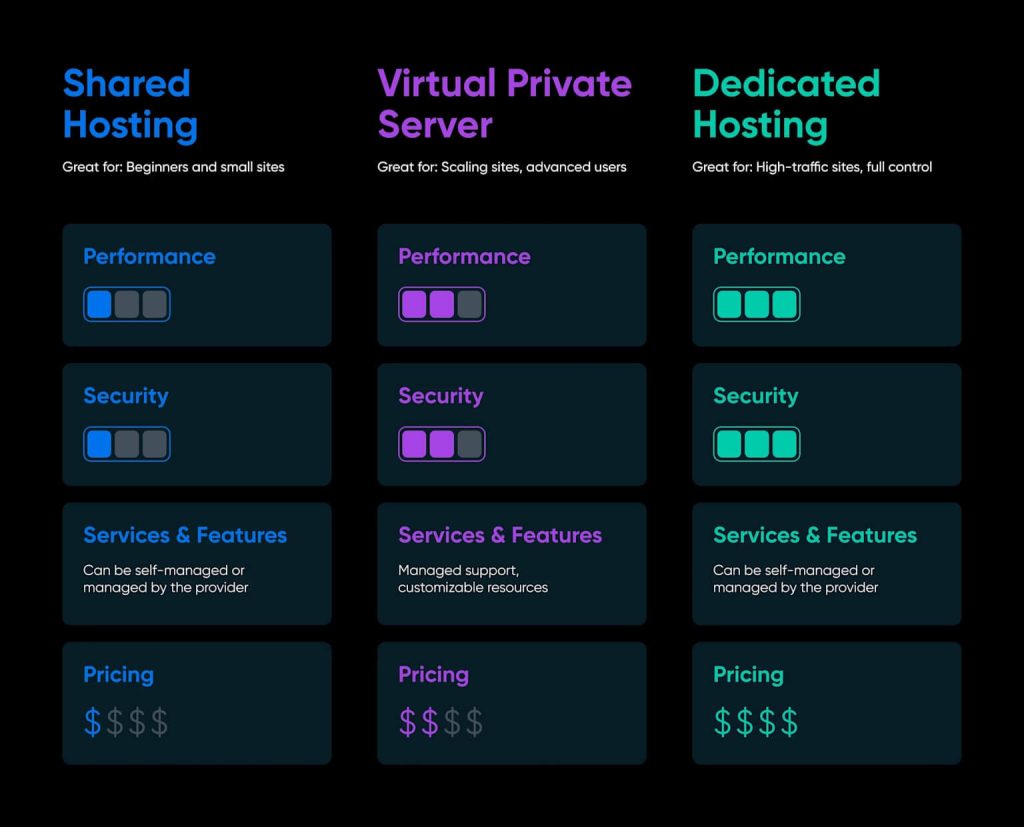
1. The 3 Types of Web Hosting (Stripped of Marketing Jargon)
Stop getting confused by technical terms. If you want to know how to choose web hosting effectively, you must understand exactly what each tier means for your wallet and your website’s Time to First Byte (TTFB).
A. Shared Hosting (The MVP Sandbox)
- How it works: You share CPU and RAM with hundreds of other websites on one server.
- The Risk: “Tragedy of the Commons.” If a neighbor gets a traffic spike, your site slows down.
- The ROI: Maximum. For under $5/month, you cap your sunk cost while testing a new business idea.
- Best for: New B2B brochure sites, niche portfolios, and anyone with under 100 daily visitors.
B. VPS Hosting (The Isolated Container)
- How it works: You still share a physical server, but your RAM and CPU are strictly isolated.
- The Risk: High opportunity cost. Managing a raw VPS requires Linux command-line skills.
- The ROI: Excellent for stability, but poor if you waste 10 hours a week playing sysadmin.
- Best for: Growing WooCommerce stores and sites that need heavy database queries.
C. Cloud Hosting (The Power-Law Hedge)
- How it works: Your site runs on a cluster of servers. If one fails, another takes over instantly.
- The Risk: Overspending. You pay a premium for elasticity you might not need yet.
- The ROI: Negative for beginners, but essential for enterprise brands where downtime costs thousands.
- Best for: High-volume e-commerce and sites running massive Google Ads campaigns.
2. The Expected Value (EV) Decision Matrix
To eliminate decision friction, find your current business stage in the matrix below and take the recommended action for your web hosting setup.
| Your Business Stage | Traffic Curve | The Best Hosting Choice | My Actionable Advice |
|---|---|---|---|
| New B2B Niche Site | Flat (0–100 UV/day) | Shared Hosting | Spend <$50/year. Validate the market first. |
| Scaling Agency / Store | Linear (100–1,000 UV/day) | Managed VPS | Pay $20–$40/month. Let the host handle server security. |
| Enterprise / Paid Ads | Spiky (Viral / Ad Traffic) | Cloud Cluster | Pay $50+/month for 100% uptime and zero SPOF. |
3. My 5 Golden Rules for Buying Hosting in 2026
Before you swipe your credit card, run the hosting provider through this veteran checklist:
- Demand cPanel: Don’t waste time learning proprietary, buggy dashboards. Standard cPanel ensures you can set up business emails and Let’s Encrypt SSLs in seconds.
- Check the Renewal Price: Hosts lure you in with $3/month deals that jump to $15/month in year two. Always calculate your 3-year total cost of ownership (TCO), not just the headline price. Make sure your site’s SEO revenue can out-earn that jump by month 12.
- Look for LiteSpeed: If you buy Shared Hosting, ensure it runs on LiteSpeed Web Server, not Apache. It is the only way a cheap server can pass Google’s strict 2026 Core Web Vitals.
- Test support before you pay: Send a pre-sales question via live chat at 11 PM on a Friday. If you get a human response within 5 minutes, the support team is real. If you get a bot loop, walk away — that is the support you will face when your site goes down at 2 AM.
- Separate your domain from your host: Never buy a domain name from your hosting provider. Register it on a dedicated registrar like Porkbun ($11/year for .com). This gives you full control: if your host fails, you can point DNS to a new server in under 10 minutes without begging a combined provider for access.
4. The Hidden Cost Audit: What You’re Actually Paying
Most hosting guides show you the advertised price. I show you the real price. Before signing up, add up these line items that providers deliberately bury in the checkout flow:
| Add-On | Typical Upsell Price | Free Alternative |
|---|---|---|
| SSL Certificate | $50–$100/year | Let’s Encrypt (free via cPanel) |
| Daily Backups | $2–$5/month | UpdraftPlus free tier + Google Drive |
| Malware Scan | $3–$10/month | Wordfence free tier |
| CDN | $10–$20/month | Cloudflare free plan |
| Domain Privacy (WHOIS) | $10–$15/year | Included free at Porkbun / Cloudflare Registrar |
A $3/month hosting plan with all paid add-ons can cost you $180+/year. A transparent $10/month plan that includes these features costs $120/year and delivers a better experience. Run the math, not the marketing.
5. The Server Location Variable (Most Guides Ignore This)
Every hosting review tells you to check uptime guarantees. Almost none tell you that physical server location is a multiplier on your SEO performance in specific markets.
Here is the physics: a page request from a visitor in Frankfurt to a server in Dallas adds roughly 100–150ms of network latency before your server even begins processing. Google’s 2026 Core Web Vitals use LCP (Largest Contentful Paint) as a ranking signal, and that 150ms penalty is measurable. For a B2B website targeting European or Southeast Asian buyers, choosing a U.S.-only data center host can silently cap your ranking ceiling.
The rule: Your primary server (or CDN edge node) should be within 50ms round-trip latency of your largest audience segment. Use tools like Pingdom or WebPageTest to measure TTFB from your target geography — not from the host’s marketing page.
6. Two Counterintuitive Rules SERP Top 10 Won’t Tell You
After 33 years of managing IT infrastructure and watching thousands of small business websites succeed and fail, here are the two rules that no affiliate review site will publish — because they reduce commissions.
Rule 1: “Unlimited” Plans Are a Liability, Not an Asset
Every major shared host advertises “unlimited storage” and “unlimited bandwidth.” Read the Terms of Service (ToS), specifically the Acceptable Use Policy (AUP). Every single one contains a “fair use” or “resource abuse” clause. In practice, this means: if your site generates CPU usage above the 99th percentile of other accounts on the same server, your host can throttle or suspend you — without refund — even on an “unlimited” plan.
The Bayesian risk model: If your site is growing, the probability of hitting this invisible ceiling increases non-linearly. The expected cost is not just downtime — it is unindexed pages, broken backlinks, and lost Google trust signals that can take 3–6 months to recover. A finite, clearly defined VPS resource allocation is less psychologically satisfying but mathematically safer.
Rule 2: Migration Cost Is Your Real Lock-In, Not Contracts
Hosts rarely charge you to leave. The real switching cost is operational: re-pointing DNS, reconfiguring email MX records, testing WordPress after a PHP version change on the new server, and the 24–72 hour DNS propagation window during which some visitors see a broken site. For a B2B site dependent on contact form inquiries, that propagation window is pure lost revenue.
The decision-theory implication: The best time to negotiate with your current host is before your renewal date, not after. Contact support 45 days before renewal and ask for a loyalty discount. In my experience, hosts will offer 20–40% off rather than lose an account. If they refuse, only then is migration worth the operational friction.
The Bottom Line
Stop over-engineering your initial setup. If your site is new, cap your downside risk. Start with a high-quality, LiteSpeed-enabled shared hosting plan with transparent renewal pricing, a server location that matches your audience geography, and domain registration kept separate.
 Read my honest review of the $47.88/year entry-level hosting I use for my own test sites, complete with real TTFB performance data and my actual credit card receipt.
(Want to compare top-tier setups? Check out our complete roundup of the Best WordPress Hosting in 2026.)
Still unsure? Our step-by-step checklist on how to choose web hosting makes it easy — even if you’ve never purchased a server plan before. Bookmark this guide and revisit it every time you’re ready to scale your infrastructure.