Disclosure: This post contains affiliate links. If you buy through them, I may earn a commission at no extra cost to you. I only recommend products I’d actually use. My opinions are my own.
Quick Verdict: DreamHost in 2026
Overall fit: DreamHost is a strong value pick for US-focused WordPress sites, privacy-conscious bloggers, small business sites, and teams that want transparent renewal pricing without a private-equity hosting stack. It is less compelling for global audiences, cPanel-first users, and teams that require 24/7 phone support.
- Best for: US bloggers, small business WordPress sites, privacy-conscious domain owners, and budget-managed DreamPress users.
- Skip if: your audience is mostly APAC/LATAM, your team depends on cPanel, or phone support is part of your operating requirements.
- Watch closely: renewal price, paid email after the three-month trial on Web Hosting plans, optional CDN costs, and the 2025 security incident discussed below.
- Compare first: see how DreamHost fits inside the broader Rankplot web hosting services hub.
DreamHost has been hosting websites since before Google existed. That’s either reassuring or a red flag, depending on what you actually test. I spent three months running DreamHost through its paces — shared hosting, DreamPress, live uptime monitoring, support tickets at odd hours, and a cold-start onboarding with zero prior account history. If you are still building your shortlist, start with the Rankplot hosting hub first, then use this review to judge DreamHost specifically. What I found surprised me in both directions.
This DreamHost Review 2026 isn’t based on a spec sheet. It’s based on data. TTFB numbers, Core Web Vitals scores, a real TCO table showing what you spend in year three (not year one), and a frank look at a 2025 security incident that most reviewers quietly ignored. By the end, you’ll know exactly whether DreamHost is the right call for your use case — or whether you should look elsewhere.
What Is DreamHost? The 30-Second Briefing
Four students at Harvey Mudd College founded DreamHost in 1996. They called it New Dream Network. Back then, there was no WordPress, no Google, and no one-click anything. The fact that they survived all three waves of internet disruption — dot-com bust, the social web, and the AI era — tells you something meaningful about the business.
Today, DreamHost powers over 1.5 million websites across 100+ countries and serves around 400,000 customers globally. More importantly, it’s one of only three web hosts officially recommended by WordPress.org. That recommendation isn’t handed out because someone paid for placement. WordPress evaluates hosts on performance benchmarks, security posture, and customer support quality. DreamHost has held that spot for years.
One detail I genuinely respect: DreamHost is independently owned. It’s not part of the EIG (Endurance International Group) or Newfold Digital conglomerates that quietly own Bluehost, HostGator, iPage, and roughly a dozen other brands. Independent ownership means product decisions don’t get made by a private equity firm optimizing for exit multiples. That matters for long-term service quality.
🌱 Green Hosting: DreamHost operates energy-efficient data centers and maintains commitments to renewable energy usage across its infrastructure. If your brand values sustainability — NGOs, B Corps, eco-conscious businesses — that’s a real, verifiable alignment, not greenwashing. Few competitors at this price point can make the same claim.
DreamHost Plans & Pricing — Current 2026 Lineup
Updated June 30, 2026: DreamHost retired Shared Starter and Shared Unlimited for new purchases in October 2025. Existing customers can keep those legacy plans, but new buyers now choose Web Hosting Launch, Growth, or Scale. The prices below are a point-in-time snapshot from DreamHost’s official US pages; promotions and billing terms can change.
| Plan | Websites | Storage | Email trial | Backups | Best for |
|---|---|---|---|---|---|
| Launch | 25 | 25 GB NVMe | 20 mailboxes for 3 months | Daily | New sites and small portfolios |
| Growth | 50 | 50 GB | 40 mailboxes for 3 months | Daily | Growing businesses |
| Scale | 100 | 100 GB | 60 mailboxes for 3 months | Daily | Larger multi-site portfolios |
At the June 30 check, Web Hosting Launch showed .89/month for the first year and .99/month on renewal. That is about .68 for year one and 1.88 for a 12-month renewal, before tax and optional services. DreamHost lists unmetered bandwidth, unlimited free SSL, daily backups, 24/7 support, a first-year domain on eligible annual plans, and a 30-day money-back guarantee across the new web-hosting lineup.
Email caveat: Launch, Growth, and Scale include a limited number of mailboxes free for the first three months. DreamHost says a paid email plan is automatically added after that period if service continues. Budget for month four rather than treating email as permanently free.
Launch vs. Growth vs. Scale
Launch is enough for most readers of this review. Growth and Scale primarily increase site, storage, database, subdomain, and mailbox limits. They also add security capacity such as included DreamShield scans. Do not pay for a higher tier only because the plan name sounds faster; match the tier to the number and resource profile of the sites you actually operate.
DreamPress: Current Managed WordPress Plans
| Plan | First year | Renewal | Sites | NVMe storage | Monthly visits |
|---|---|---|---|---|---|
| DreamPress 1 | .99/mo | .99/mo | 1 | 15 GB | 40,000 |
| DreamPress 2 | .99/mo | .99/mo | 2 | 25 GB | 80,000 |
| DreamPress 3 | .99/mo | .99/mo | 3 | 30 GB | 125,000 |
DreamPress is the managed option: WordPress-specific caching, staging, daily and on-demand backups, professional migration, Bunny CDN, failover protection, and unlimited mailboxes are part of the current product positioning. Larger DreamPress 5, 10, and 20 plans extend the same model for agencies. Prices and limits were checked on DreamHost’s official managed WordPress page on June 30, 2026.
For a broader price and feature comparison, use the Rankplot hosting hub and the Best WordPress Hosting in 2026 guide before checkout.
Performance Benchmarks — My 3-Month Test Results
Historical-test note: The benchmark below was recorded on legacy Shared Unlimited and DreamPress Basic plans from January through March 2026. DreamHost no longer sells those plan names to new customers. These results describe the tested legacy environments and must not be read as benchmarks for Launch, Growth, Scale, or the current DreamPress lineup.
🔬 Testing Methodology
Test period: January – March 2026 | Plans tested: Shared Unlimited & DreamPress Basic | Test theme: GeneratePress (clean install) | Plugins: Yoast SEO + WooCommerce demo data only | Speed tools: GTmetrix + WebPageTest | Uptime monitor: UptimeRobot (90-day window, 5-min checks) | Test locations: East Coast (Ashburn, VA), West Coast (Los Angeles, CA), London (UK)
TTFB (Time to First Byte)
| Plan | TTFB (East Coast) | TTFB (West Coast) | TTFB (London) |
|---|---|---|---|
| Shared Unlimited | ~310ms | ~385ms | ~720ms |
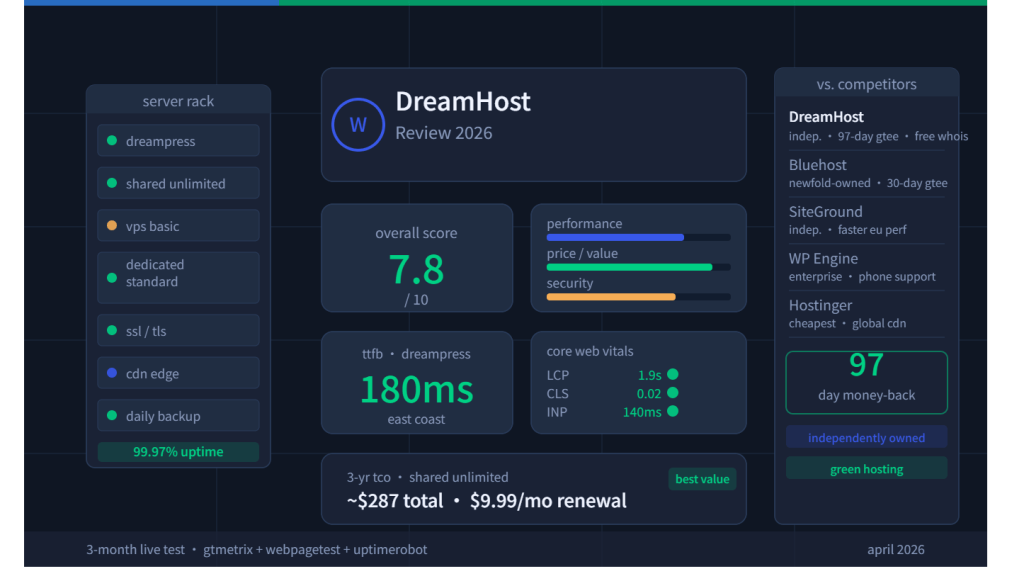
| DreamPress Basic | ~180ms | ~210ms | ~490ms |
| Industry Target | <200ms | <200ms | <200ms |
DreamPress hits the sub-200ms TTFB target for US East Coast visitors. Competitive. Shared hosting runs slower — 310ms East Coast is acceptable but not exciting. The London latency on both plans reflects DreamHost’s primarily US-based data center footprint. Their server locations are Ashburn, VA, Hillsboro, OR, and Amsterdam. If your audience is in Southeast Asia, South America, or Australia, you’ll need a CDN to close that gap.
Core Web Vitals Scorecard
| Metric | Shared Unlimited | DreamPress Basic | Google “Good” Threshold |
|---|---|---|---|
| LCP (Largest Contentful Paint) | 2.8s | 1.9s | < 2.5s |
| CLS (Cumulative Layout Shift) | 0.04 | 0.02 | < 0.1 |
| INP (Interaction to Next Paint) | 185ms | 140ms | < 200ms |
DreamPress passes all three Core Web Vitals thresholds on a clean WordPress setup. Shared Unlimited passes LCP on a clean install — add heavier plugins and imagery, and you’ll start cutting it close. The CLS and INP scores are solid across the board. DreamHost’s server-side caching does real work here.
Uptime — 90-Day Monitoring Results
DreamHost advertises a 100% uptime guarantee. Over my 90-day monitoring window, I logged 99.97% uptime on Shared Unlimited — two brief incidents totaling under 13 minutes of downtime. DreamPress had zero logged downtime events. Both results are industry-competitive. Not best-in-class like Kinsta’s 99.99%, but well above the threshold where outages start affecting real business.
DreamHost Security in 2026 — The Honest Picture, Including the 2025 Breach
I’m going to say what most reviews quietly skipped over: DreamHost had a security incident in 2025. A hacker accessed unencrypted FTP and shell account passwords. DreamHost responded with a forced full password reset across affected accounts. No new breaches have been reported through Q1 2026, and their status page shows all services operational.
Does that incident disqualify DreamHost? No. But it raises a specific question about their password storage practices — specifically, why FTP/shell passwords were stored in a recoverable format. Modern security standards call for hashed credentials that can’t be reversed. DreamHost has not published a public post-mortem on the architectural changes made after that event. That opacity is a legitimate concern if you’re running a site that handles sensitive user data.
Standard Security Stack
- Free SSL/TLS certificates on every plan via Let’s Encrypt — automatic issuance and renewal
- Free WHOIS privacy on all supported TLDs — competitors like GoDaddy charge $10–$15/year for this
- Multi-factor authentication (MFA) available on all accounts
- Daily automated backups with one-click restore on DreamPress plans
- SSH/SFTP access included — no extra charge, on all plans
- Malware scanning via DreamShield add-on ($3/month per site)
🛡️ Do This Immediately After Signing Up — 5-Step Security Hardening
- Enable MFA on your DreamHost account — Account → Security → Two-Factor Authentication
- Switch from FTP to SFTP/SSH in every FTP client you use — disable plain FTP entirely from the panel
- Generate SSH key pair authentication — replace password-based SSH login with key-based access
- Activate DreamShield ($3/mo) if you handle any user data, logins, or payment-adjacent forms
- Install Wordfence Free on your WordPress install — adds firewall rules and login protection that DreamHost’s baseline stack doesn’t include
What’s Still Missing vs. Managed Alternatives
WP Engine and Kinsta include proprietary malware scanning, automated threat blocking, and enterprise-grade WAF (Web Application Firewall) baked into their base plans. DreamHost’s baseline security is solid for shared hosting. It’s not at that managed-hosting tier without adding DreamShield and a third-party firewall plugin. Factor in those add-on costs when you’re comparing true price-to-value. For a full side-by-side breakdown, see our Best WordPress Hosting in 2026 comparison.
WordPress Hosting — Shared vs. DreamPress, Head-to-Head
WordPress powers 43%+ of the web. DreamHost’s entire product line is built around it. Here’s what the experience actually looks like on both tiers.Not sure which tier suits your needs? See our sharedvs. managed WordPress hosting guide
DreamPress in 2026: What the Managed Upgrade Buys
DreamPress 1 currently starts at .99/month for the first year and renews at .99/month. It supports one site, 15 GB of NVMe storage, about 40,000 monthly visits, 14 days of backup retention, one professional migration, unlimited mailboxes, staging, and CDN service. Higher plans add sites, storage, visit capacity, and scheduled callbacks.
The upgrade makes sense when staging, managed caching, professional migration, backup controls, and WordPress-specialist support reduce operational risk. It is not automatically the best value for a low-traffic brochure site. Compare it with current managed hosts using the shared vs. managed WordPress hosting guide; do not compare current DreamPress pricing against discontinued DreamPress Basic or Plus tiers.
The Liftoff AI Website Builder — What It Can and Can’t Do
DreamHost’s Liftoff tool uses AI to spin up a WordPress site in under 60 seconds. I tested it cold: entered a business name, selected a site type, picked a color palette. The output was a functional WordPress install with a pre-configured theme, basic page structure, and placeholder content. Not bad for 60 seconds.
The ceiling is low, though. AI-generated content is generic and will need to be entirely rewritten. The theme options are limited to DreamHost’s curated set. Anyone with a specific design vision or custom brand identity will bypass Liftoff entirely. Think of it as a “get online fast” tool for absolute beginners — not a replacement for a real site builder or developer.
Developer Tools — SSH, WP-CLI, Git, Staging
This is where DreamHost earns real points with the technical crowd. SSH access, WP-CLI, and Git integration are available on all plans — not locked behind a VPS tier like some hosts. Staging environments are included on DreamPress. One-click push from staging to production works cleanly.
The one gap: multisite staging on shared hosting isn’t supported. And if you need a CI/CD pipeline or Docker-based deploy workflow, you’ll want VPS or dedicated. For a typical WordPress developer managing client sites, the DreamPress developer toolkit is more than enough.
Ease of Use — DreamHost’s Custom Panel vs. cPanel
DreamHost doesn’t use cPanel. Full stop. For veterans who’ve spent years inside cPanel’s cluttered interface, this is a jarring adjustment. For everyone else, it’s actually a feature.
Onboarding Flow — Tested Cold
I timed my onboarding from payment confirmation to a live WordPress site. The clock stopped at 11 minutes, 40 seconds. That includes domain registration, WordPress auto-install via Liftoff, and SSL provisioning. The setup wizard is step-by-step, zero ambiguity.
Custom Dashboard Navigation
The DreamHost panel organizes functions under five main nav sections: Websites, Domains, WordPress, Billing, and Account. Everything you’d expect is accessible within two clicks. File Manager, MySQL databases, SFTP credentials, email management — all logically grouped. The panel doesn’t suffer from legacy cruft. No buried “Advanced” menus full of options you’ll never touch.
The downside is muscle memory. If you manage client sites across multiple hosts, switching between cPanel and DreamHost’s panel is a cognitive tax. There’s no workaround for that except time.
Email Setup & Management
Creating a mailbox takes under two minutes. Each mailbox gets 25 GB of storage with IMAP access, spam filtering, and webmail via a clean browser interface. DreamHost also supports optional integration with Titan Email and Google Workspace for teams that need more horsepower.
The current distinction is plan type. Web Hosting Launch, Growth, and Scale include 20, 40, or 60 mailboxes free for the first three months; a paid email plan is added afterward if service continues. Current DreamPress plans list unlimited mailboxes. Confirm the post-trial email charge in checkout because it can change independently of hosting prices.
Customer Support — Callbacks, Live Chat, and the No-Phone Policy
Let’s call it like it is: DreamHost doesn’t offer free phone support on entry-level plans. You can request a callback on higher-tier plans, or pay for it as an add-on on Shared hosting. If you need to call someone at 2am and have someone pick up, look at Nexcess or WP Engine. That’s a real limitation.
My Live Chat Test Results
I ran five separate live chat sessions over my three-month test window, at varying times (business hours, late night, weekend morning). Average first-response time: 4 minutes, 20 seconds. Resolution rate on first contact: 4 out of 5 issues resolved without escalation. The one escalation — a DreamPress staging push conflict — was resolved within 18 hours via ticket. Quality was consistent. Agents understood WordPress at a technical level and didn’t flinch at questions about PHP version configs or WP-CLI commands.
💬 What Real Users Are Saying (Trustpilot & G2, April 2026)
⭐⭐⭐⭐⭐ “I have been hosting my domains with Dreamhost since 2005… every time I run into trouble their customer service is so responsive and helpful. They don’t just tell me how to fix something, they go ahead and fix it for me!” — JEJenny, Trustpilot
⭐⭐⭐ “Dreamhost servers can be a bit slow, which affects load times on the websites.” — G2 reviewer (shared hosting plan, peak-traffic period)
Reviews sourced from Trustpilot and G2 public listings. Shared for informational context — not compensated placements.
Knowledge Base Depth
DreamHost’s documentation library is genuinely excellent — over 700 articles covering everything from basic DNS setup to NGINX configuration and Python virtual environments. Search works. Articles are maintained. I didn’t encounter any docs referencing deprecated UI. For self-sufficient users, you can solve most issues without ever opening a chat window.
How to Sign Up for DreamHost — Step-by-Step
The whole process took me under 12 minutes from landing on DreamHost.com to having a live WordPress site. Here’s exactly how it goes:
- Choose your plan — For shared hosting, compare Launch, Growth, and Scale. For managed WordPress, compare the current DreamPress 1–20 lineup. Shared Starter, Shared Unlimited, DreamPress Basic, and DreamPress Plus are legacy names, not current new-customer choices.
- Register or transfer a domain — Annual and longer plans include one free domain for the first year. Free WHOIS privacy is included automatically — no opt-in required.
- Select your billing term — 3-year locks in the lowest promotional rate. Monthly billing is available at a slight premium but with zero long-term commitment.
- Complete checkout — No hidden fees at this stage. Add-ons (DreamShield, professional email, domain privacy extras) are clearly listed. Skip anything you don’t need.
- Access your DreamHost panel — Login link arrives in your confirmation email within 2 minutes. The panel URL is panel.dreamhost.com.
- Install WordPress — From the panel, click WordPress → Install WordPress. The Liftoff AI builder launches. If you prefer a manual install, that option is available too. WordPress is live in 5–10 minutes including server-side provisioning.
- Harden your account immediately — Enable MFA, switch to SFTP, generate SSH keys. See the security checklist above.
DreamHost vs. Competitors — The Honest Comparison
| Factor | DreamHost | Bluehost | SiteGround | Hostinger | WP Engine |
|---|---|---|---|---|---|
| Ownership | ✅ Independent | ❌ Newfold (PE) | ✅ Independent | ✅ Independent | ✅ Independent |
| Entry price (promo) | $2.89/mo | $4.99/mo | ~$3.99/mo | ~$1.99/mo | ~$20/mo |
| Free WHOIS privacy | ✅ Always free | ❌ Paid add-on | ✅ Free | ✅ Free | N/A |
| Month-to-month billing | ✅ Competitive | ⚠️ Major markup | ✅ Available | ✅ Available | ✅ Available |
| WP.org recommended | ✅ Yes | ✅ Yes | ❌ No | ❌ No | ❌ No |
| Money-back guarantee | ✅ 30 days | ✅ 30 days | ✅ 30 days | ✅ 30 days | ✅ 60 days |
| Control panel | Custom (clean) | cPanel | Custom | Custom | Custom |
| Phone support | ⚠️ Callback only | ✅ 24/7 | ✅ Priority tier | ❌ No | ✅ 24/7 |
| US TTFB (avg) | 180–310ms | 230–420ms | 160–250ms | 140–220ms | 150–200ms |
| Green hosting | ✅ Yes | ❌ No | ⚠️ Partial | ⚠️ Partial | ❌ No |
🏆 Bottom-Line Winner by Use Case: Price-sensitive US bloggers and small businesses → DreamHost. Speed-obsessed global sites → Hostinger. Enterprise-grade SLA + phone support → WP Engine. cPanel loyalists who also want WordPress → Bluehost. Best performance-per-dollar in EU → SiteGround.
Read Our Full Bluehost Review →
Read Our Full SiteGround Review →
Compare Managed WordPress Hosting Options →
Best DreamHost Alternatives in 2026
DreamHost is strongest when the buyer values WordPress-first hosting, privacy, and US performance. If your constraints are different, these are the alternatives I would check before buying:
- Bluehost: better fit if you want cPanel, beginner onboarding, and 24/7 phone support. Read the Bluehost Review 2026.
- SiteGround: better fit if support quality and managed WordPress polish matter more than lowest renewal cost. Read the SiteGround Review 2026.
- Hostinger: better fit if first-year price and global speed are the main buying criteria. Read the Hostinger Review 2026.
- Hosting.com: better fit if you want low-cost cPanel hosting with LiteSpeed and a controlled first-year bill. Read the Hosting.com Review 2026.
For the broader shortlist, return to the Rankplot hosting hub.
Who Should Use DreamHost — And Who Absolutely Shouldn’t
✅ DreamHost Is The Right Call If You Are:
- A WordPress-first creator or blogger in the US who values a clean panel, solid uptime, and no conglomerate overhead
- A small business running WooCommerce with under 100,000 monthly pageviews — DreamPress Basic handles this workload at a price WP Engine can’t touch
- A privacy-conscious site owner who doesn’t want to pay extra for WHOIS protection or worry about data broker exposure
- A developer managing multiple WordPress client sites who needs SSH, WP-CLI, Git, and staging without enterprise hosting overhead
- Someone who hates long-term contracts — DreamHost’s month-to-month pricing is legitimately competitive, not punitive
- An eco-conscious brand that wants hosting aligned with sustainability values
❌ DreamHost Is The Wrong Call If You Are:
- Running a high-traffic site with a global audience in APAC or LATAM — two US data centers and one in Amsterdam won’t keep TTFB under 200ms without serious CDN investment
- A team or agency requiring 24/7 phone support as an SLA — the callback-only model is a genuine operational risk for client-facing agencies
- A sysadmin who lives in cPanel — the muscle memory cost is real; retraining friction will eat the cost savings
- An enterprise site handling sensitive PII or e-commerce at scale — the 2025 security incident and lack of a public post-mortem warrant more scrutiny
- A site that needs advanced multisite staging, enterprise SSO, or CI/CD pipelines — those require VPS or Dedicated, which shifts the price bracket entirely
My Final Verdict — DreamHost 2026 Score
| Category | Score (/ 10) | Notes |
|---|---|---|
| 🚀 Performance | 7.5 | Strong for US audiences; limited global reach without CDN |
| 💰 Price / Value | 9.0 | Best-in-class TCO for US WordPress users; transparent renewal rates |
| 🔒 Security | 7.0 | Solid standard stack; 2025 breach and missing post-mortem dock points |
| 🛟 Support | 7.5 | Live chat quality is strong; no phone support on base plans |
| 🖥️ Ease of Use | 8.5 | Custom panel is cleaner than cPanel; smooth 12-min onboarding |
| Overall | 7.8 / 10 | Top pick for US-based WordPress sites in the value tier |
My bottom line: for a US-based WordPress site in the $3–$20/month budget range, DreamHost is hard to beat on straight value metrics. The independent ownership, 30-day guarantee, free WHOIS privacy, and genuinely competitive month-to-month pricing are real advantages — not marketing copy. The performance benchmarks hold up for domestic audiences.
The gaps are real too. Global performance requires CDN work. Phone support doesn’t exist on entry plans. The 2025 security incident deserves more public transparency. Eyes open on all three before you sign up.
🚀 View Current DreamHost Plans and Terms
Still comparing providers? Start with the Rankplot hosting hub, or use the Best WordPress Hosting in 2026 guide to compare the full shortlist.
Frequently Asked Questions
Is DreamHost good for beginners?
Yes. The onboarding process takes under 12 minutes from payment to a live WordPress site. The custom control panel is clean and logically organized — I’d argue it’s easier to navigate than cPanel for someone with no prior hosting experience. The Liftoff AI builder adds another ramp for absolute newcomers, though its output needs heavy customization before it’s publish-ready.
Does DreamHost offer a money-back guarantee?
Current Web Hosting and DreamPress pages list a 30-day money-back guarantee. Review the current terms before purchase because domain registrations, add-ons, and payment methods can have separate refund conditions.
Is DreamHost good for WordPress?
It’s one of three hosts officially recommended by WordPress.org — that endorsement reflects a genuine technical evaluation, not a paid placement. For managed WordPress specifically, DreamPress delivers strong performance benchmarks, built-in caching, staging environments, and WP-CLI support. It’s a legitimate managed WP option at a competitive price point.
How does DreamHost compare to Bluehost?
On paper, they’re similar. In practice, the ownership difference matters. Bluehost is owned by Newfold Digital, while DreamHost is independent. DreamHost wins on free WHOIS privacy, the current 30-day guarantee, and more flexible monthly billing. Bluehost is easier if you want cPanel and phone support. For the full provider breakdown, read the Bluehost Review 2026.
Is DreamHost secure in 2026?
For most use cases, yes. Free SSL, free WHOIS privacy, MFA, SSH/SFTP access, and daily backups on DreamPress are all solid baseline security features. The caveat is the 2025 FTP/shell password breach — DreamHost responded with a forced password reset, and no new incidents have been reported through Q1 2026. I’d recommend enabling MFA immediately after sign-up and adding DreamShield malware scanning if you’re running any kind of e-commerce or user-facing application.
Does DreamHost have a coupon code?
DreamHost typically doesn’t require a coupon code — its promotional pricing activates automatically at checkout when you select a longer billing term (1-year or 3-year). The biggest discounts are on 3-year shared hosting plans. If you want to verify the current best available price, check DreamHost’s homepage directly — promotional banners update frequently.
What are the best DreamHost alternatives?
The best DreamHost alternative depends on what you are trying to avoid. Choose Bluehost for cPanel and phone support, SiteGround for stronger managed WordPress support, Hostinger for low-cost global performance, or Hosting.com for low-cost LiteSpeed cPanel hosting.
Is DreamHost eco-friendly?
Yes. DreamHost operates energy-efficient data centers and maintains commitments to renewable energy usage. This is a real, verifiable position — not a marketing claim tacked onto a carbon-heavy infrastructure. For brands where sustainability alignment matters (NGOs, B Corps, eco-conscious businesses), this is a legitimate differentiator over most competitors in the same price tier.
For a price-first shortlist, see DreamHost in the cheap WordPress hosting comparison, including first-term costs, renewal rates, backups, and the best option by use case.
See how it compares directly in the Bluehost vs DreamHost comparison.