Quick Verdict
Choose Hostinger if you want the stronger value deal for multiple small WordPress sites. Its WordPress plans show renewal prices publicly, and the Business + AI plan gives a practical bundle: 50 websites, 50 GB NVMe storage, daily and on-demand backups, staging, CDN, and WordPress AI tools.
Choose Bluehost if you want a more guided WordPress setup and a support path that feels familiar to beginners. Bluehost is easier to explain to someone building a first WordPress site, and its Business and eCommerce Essentials plans list phone support.
Rankplot verdict: Hostinger wins on value and multi-site flexibility. Bluehost wins on beginner onboarding and support comfort. The wrong way to choose is by looking only at the first promo price. The right way is to compare renewal cost, site limits, storage, backups, support, and how much help you want during setup.
Compare more WordPress hosting options in Rankplot’s Best WordPress Hosting guide.
Hostinger vs Bluehost: Quick Comparison
| Category | Hostinger | Bluehost | Rankplot Take |
|---|---|---|---|
| Best for | Value-focused WordPress users, multi-site owners, budget projects | Beginners who want guided setup and support | Hostinger for value; Bluehost for onboarding |
| Entry WordPress plan checked | Premium | Starter | Both are beginner plans |
| Promo price checked | $2.99/mo for 48 months | $3.99/mo for 36 months | Hostinger is cheaper on checked promo pricing |
| Renewal visibility | Renewal prices shown on Hostinger page | Renewal prices verified from browser screenshot on June 22, 2026 | Both are now usable for publish prep; recheck before future updates |
| Websites on entry plan | Up to 3 websites | 10 websites | Bluehost allows more sites on entry plan |
| Storage on entry plan | 20 GB SSD | 10 GB NVMe SSD | Hostinger gives more capacity; Bluehost uses NVMe |
| Backups on entry plan | Weekly automatic backups | Weekly website backups | Similar basic backup coverage |
| CDN | Business + AI and above include free CDN | Free CDN listed on plans | Bluehost surfaces CDN more broadly |
| Phone support | Not the main support path | Not on Starter; included on Business and eCommerce Essentials | Bluehost wins if phone support matters |
| AI tools | WordPress AI tools on Business + AI and Cloud Startup + AI | AI site creation tools on WordPress plans | Both have AI tools, but for different jobs |
This is not a one-host-wins-everything comparison. Hostinger answers the value question better: “How much WordPress hosting do I get for the money?” Bluehost answers the beginner question better: “Which one will feel easier when I build my first WordPress site?”
Pricing and Renewal Math
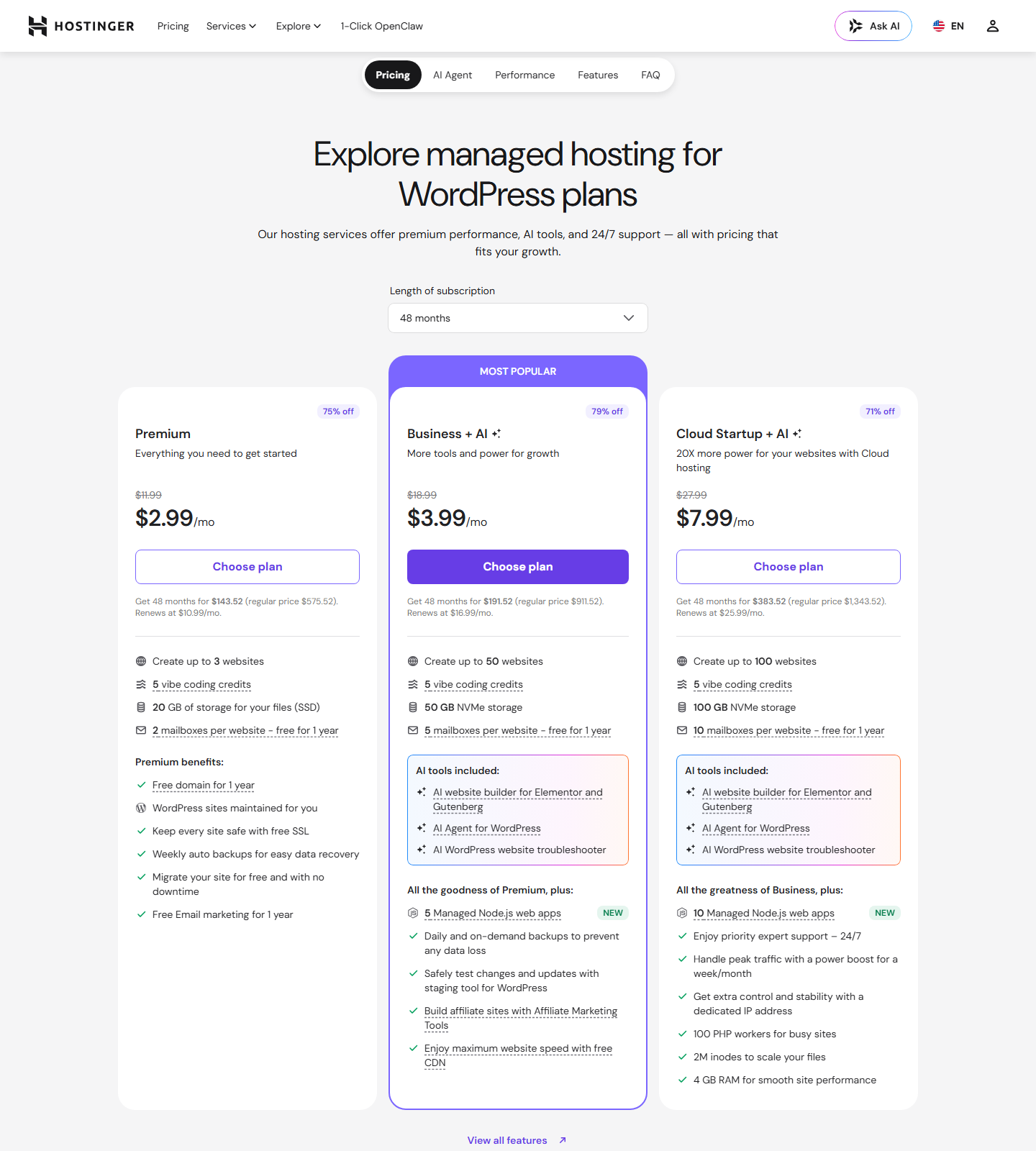
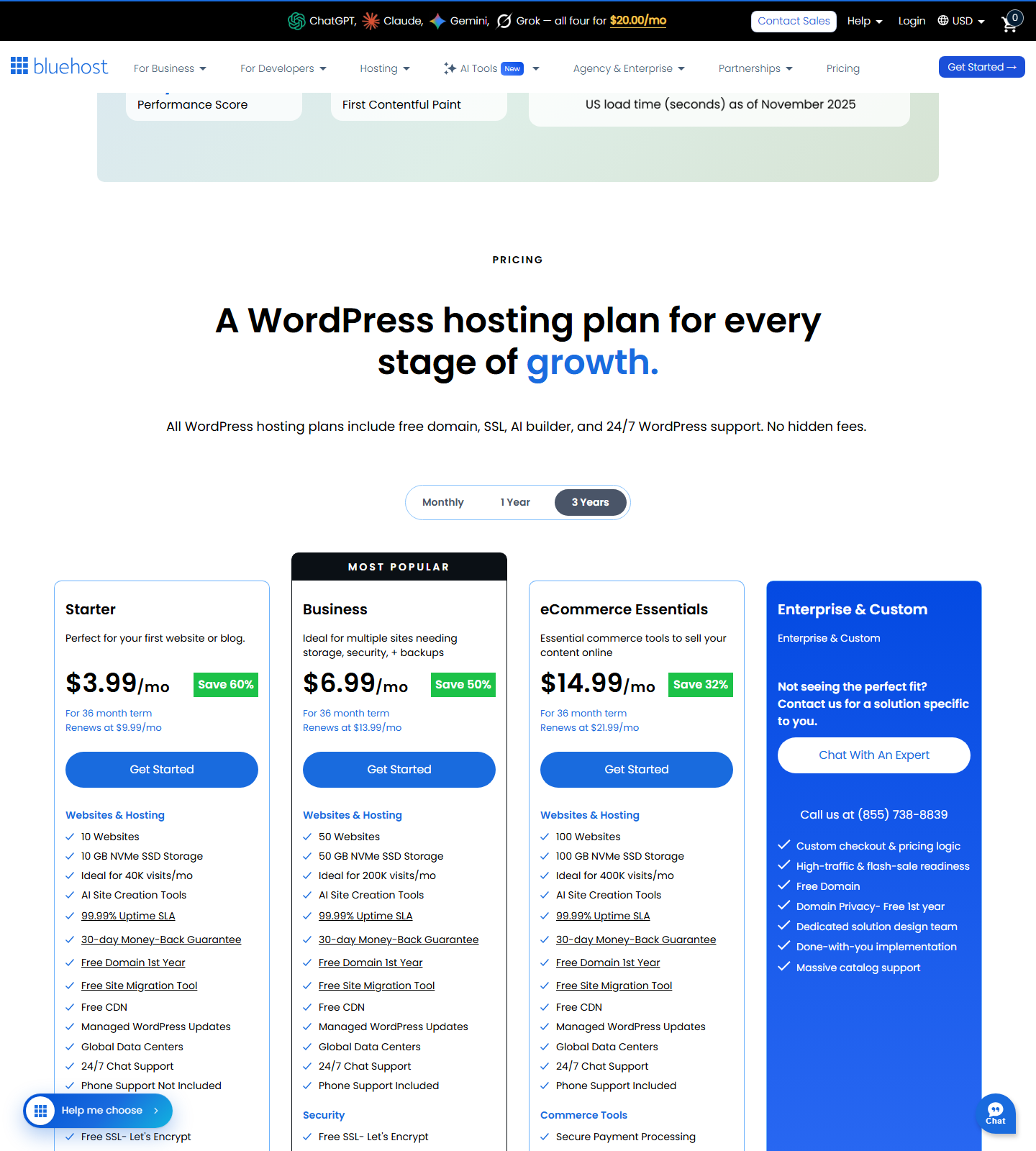
Hosting prices change often. Treat this as a June 22, 2026 snapshot, not a permanent price sheet.
| Plan | Promo Price Checked | Term Checked | Renewal Note | Sites | Storage | Best Fit |
|---|---|---|---|---|---|---|
| Hostinger Premium | $2.99/mo | 48 months | Renews at $10.99/mo | 3 | 20 GB SSD | First small site or low-cost starter setup |
| Hostinger Business + AI | $3.99/mo | 48 months | Renews at $16.99/mo | 50 | 50 GB NVMe | Best Hostinger value for most WordPress users |
| Hostinger Cloud Startup + AI | $7.99/mo | 48 months | Renews at $25.99/mo | 100 | 100 GB NVMe | Higher-traffic or multi-site users |
| Bluehost Starter | $3.99/mo | 36 months | Renews at $9.99/mo | 10 | 10 GB NVMe SSD | First WordPress site or blog |
| Bluehost Business | $6.99/mo | 36 months | Renews at $13.99/mo | 50 | 50 GB NVMe SSD | Multiple sites, phone support, stronger security bundle |
| Bluehost eCommerce Essentials | $14.99/mo | 36 months | Renews at $21.99/mo | 100 | 100 GB NVMe SSD | WooCommerce and paid-content projects |
Hostinger is easier to evaluate from its public page because it shows both promo pricing and renewal pricing. The Premium, Business + AI, and Cloud Startup + AI plans all displayed renewal prices during research.
Bluehost showed 36-month promo prices and plan features. A browser screenshot captured on June 22, 2026 showed renewals of $9.99/mo for Starter, $13.99/mo for Business, and $21.99/mo for eCommerce Essentials. Treat those as a pricing-page snapshot and recheck before any future refresh.
For most readers, the useful comparison is not Hostinger Premium vs Bluehost Starter. The cleaner middle-plan comparison is Hostinger Business + AI vs Bluehost Business. Both support 50 websites and 50 GB NVMe storage. Hostinger has the lower checked promo price and stronger value bundle; Bluehost adds phone support and a more traditional WordPress support path.
WordPress Setup and Ease of Use
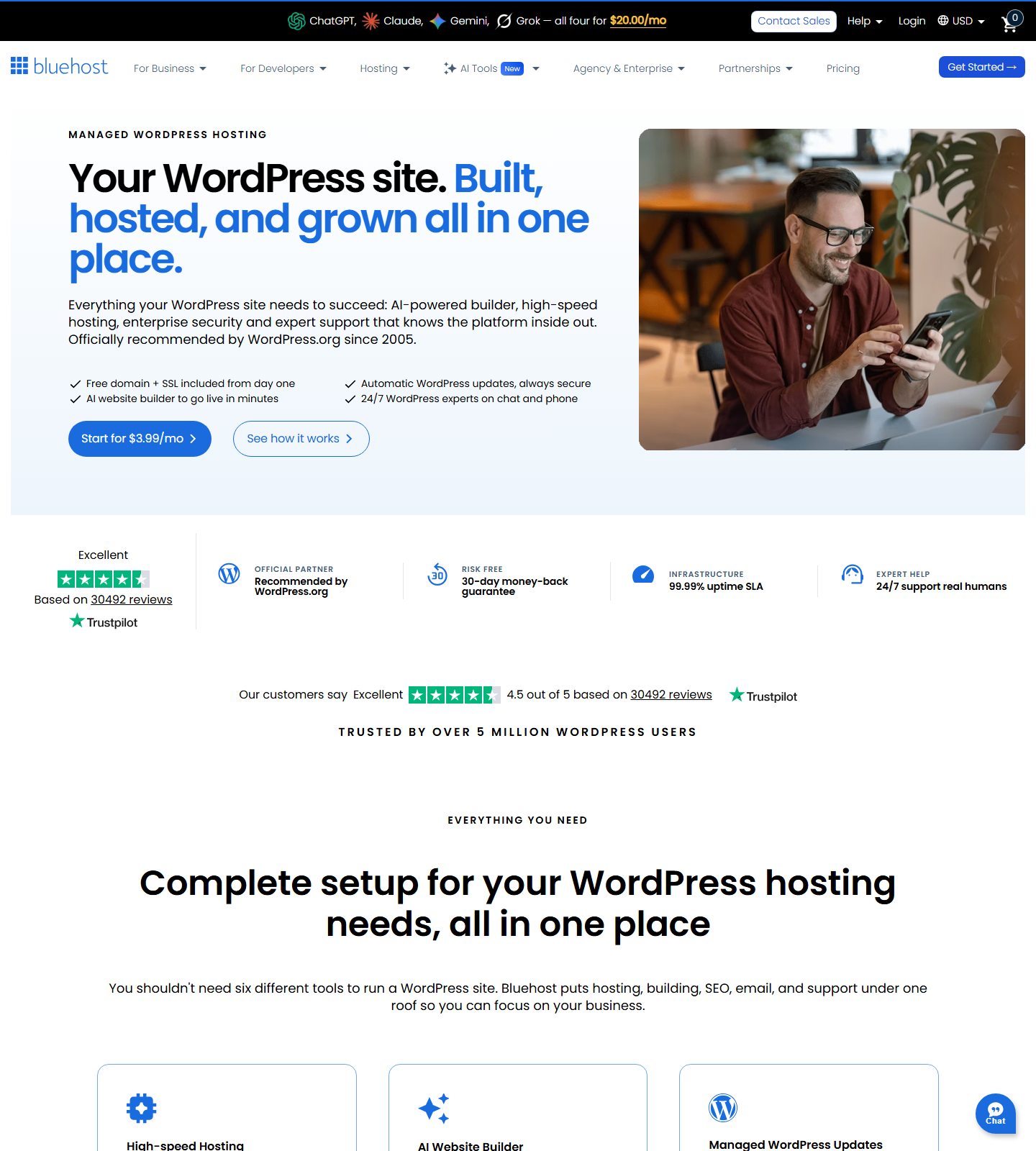
Bluehost feels more intentionally built for the first-time WordPress user. Its WordPress hosting page leans hard into AI-powered setup, guided site creation, drag-and-drop editing, and WordPress support. If you are launching your first business site and want the path to feel obvious, Bluehost has the cleaner onboarding story.
Hostinger is also beginner-friendly, but it feels more like a hosting control panel that has grown into a broader WordPress toolkit. Its Business + AI plan includes AI website builder tools, an AI Agent for WordPress, and an AI WordPress troubleshooter. That is more useful after setup, when you are managing pages, plugins, performance, and small WordPress problems.
Rankplot’s take:
- Bluehost is easier to recommend to someone who wants a guided first-site experience.
- Hostinger is easier to recommend to someone who wants more resources, more control, and better price-to-feature value.
If you already know you will run more than one site, Hostinger’s Business + AI plan becomes more attractive quickly. If you only need one site and want less friction during setup, Bluehost Starter or Business may feel safer.
Performance and Infrastructure
Do not treat either host’s marketing claims as a full performance test. Both providers make strong speed claims, and both offer WordPress-focused infrastructure. A final published version should either include Rankplot’s own test or clearly separate official claims from third-party results.
Hostinger highlights LiteSpeed servers, smart caching, code minification, image optimization, global rerouting, and a 99.9% uptime guarantee. Its higher WordPress plans include NVMe storage, CDN, and more server resources.
Bluehost highlights NVMe storage, global data centers, static content caching, object caching, CDN, and a 99.99% uptime SLA on its WordPress hosting page. It also presents performance claims based on independent testing.
Without running the same test site on both hosts, the fair verdict is narrow:
- Hostinger looks stronger on price-to-resources.
- Bluehost packages performance features in a way beginners can understand.
- Neither should be called “the fastest” here unless Rankplot runs a controlled test.
Recommended Rankplot test before final publication:
| Test Area | Setup |
|---|---|
| WordPress version | Same version on both hosts |
| Theme | Same lightweight theme |
| Plugins | Same plugin stack |
| Test page | Same page size and image weight |
| Cache | Default host cache first, then optimized cache if needed |
| Tools | PageSpeed Insights, WebPageTest, uptime monitor |
| Runs | At least 3 runs per host |
| Locations | US and one non-US test location |
If that test is not available before publishing, keep performance claims conservative.
Storage, Website Limits, and Plan Resources
Bluehost Starter allows 10 websites on its entry WordPress plan, while Hostinger Premium allows 3. That sounds like a Bluehost win, but the storage split matters: Bluehost Starter shows 10 GB NVMe SSD storage; Hostinger Premium shows 20 GB SSD storage.
The middle plans are easier to compare:
| Middle Plan | Sites | Storage | Notable Extras |
|---|---|---|---|
| Hostinger Business + AI | 50 | 50 GB NVMe | Daily/on-demand backups, staging, CDN, AI WordPress tools |
| Bluehost Business | 50 | 50 GB NVMe SSD | Phone support, domain privacy first year, weekly backups, security bundle |
For one small site, both are enough. For multiple small sites, Hostinger Business + AI is the better value pick. For users who want phone support and a more conventional support promise, Bluehost Business has the stronger case.
Backups, Security, and CDN
Hostinger Premium includes weekly automatic backups. Business + AI adds daily and on-demand backups, staging, CDN, and extra WordPress AI tools. That makes Business + AI the Hostinger plan to compare if you care about safer updates and easier recovery.
Bluehost Starter lists weekly website backups, free SSL, malware scanning, malware detection and removal, a web application firewall, DDoS protection, CDN, object caching, and staging. Bluehost Business adds phone support and domain privacy for the first year.
The practical difference:
- Hostinger’s strongest backup/security story starts at Business + AI.
- Bluehost puts a broad security bundle into the visible plan rows even on Starter.
- If you often change WordPress themes, plugins, or WooCommerce settings, staging matters. Verify exact staging availability before publishing.
Support: Chat, Phone, and AI Help
Support is one of the clearest differences.
Hostinger focuses on 24/7 support and AI-assisted WordPress help. That is enough for users who are comfortable with chat, docs, and guided tools.
Bluehost has the stronger phone-support story. Starter does not include phone support, but Business and eCommerce Essentials list phone support as included. That matters if you do not want to troubleshoot hosting problems through chat only.
Choose Bluehost if support channel matters more than the lowest long-term cost. Choose Hostinger if you are comfortable using chat, docs, and AI-guided tools in exchange for stronger value.
Best Choice by Use Case
| Use Case | Winner | Why |
|---|---|---|
| Cheapest checked entry price | Hostinger | Lower checked promo price on the WordPress Premium plan |
| Clearest renewal snapshot | Tie | Both pages now have captured pricing screenshots; recheck before future refreshes |
| First WordPress site | Bluehost | Stronger guided onboarding and beginner positioning |
| Multiple small WordPress sites | Hostinger | Business + AI gives 50 sites and 50 GB NVMe at a lower checked promo price |
| Phone support | Bluehost | Phone support appears on Business and eCommerce Essentials |
| AI-assisted WordPress management | Hostinger | Business + AI includes WordPress AI agent and troubleshooter tools |
| WooCommerce starter | Bluehost | eCommerce Essentials is built around commerce features |
| Budget blog or content portfolio | Hostinger | Better value if you need multiple small sites |
The edge depends on the kind of beginner you are. If you want a host that feels like a guided WordPress product, Bluehost makes sense. If you want to stretch your budget across more sites and features, Hostinger is harder to beat.
Alternatives to Consider
Hostinger and Bluehost are not the only beginner WordPress hosts worth comparing.
- SiteGround is worth considering if you want a more managed WordPress feel and are willing to watch renewal pricing closely.
- DreamHost is worth considering if you want a simpler, more traditional hosting setup.
- Hosting.com is worth considering if you want another budget-focused WordPress hosting option.
If you are still choosing the category, start with How to Choose WordPress Hosting in 2026. If you want the broader shortlist, use Best WordPress Hosting in 2026.
Final Verdict
Hostinger wins for value. Its checked WordPress pricing is lower, its renewal prices were easier to see during research, and Business + AI gives a stronger package for users running more than one WordPress site.
Bluehost wins for guided setup and support comfort. Its WordPress hosting product is easier to understand for a first-time user, and Business or higher plans include phone support. That can matter more than saving a few dollars per month if you are nervous about building your first WordPress site.
Rankplot’s recommendation:
- Choose Hostinger Business + AI if you want the best mix of price, resources, backups, staging, CDN, and WordPress AI tools.
- Choose Bluehost Business if you want guided WordPress setup, phone support, and a familiar beginner hosting experience.
- Avoid choosing either host only from the first promo price. Renewal math and support expectations are what usually decide whether a host still feels good after year one.
FAQ
Is Hostinger Better Than Bluehost?
Hostinger is better if your main priorities are value, multi-site flexibility, and visible renewal pricing. Bluehost is better if you want guided WordPress setup and a traditional support path, especially with phone support on Business or higher.
Is Bluehost Better for WordPress Beginners?
Bluehost is easier to recommend for a first WordPress site because its onboarding and support story is built around beginners. Hostinger is also beginner-friendly, but it is stronger when you care about price-to-resources and running multiple sites.
Which Is Cheaper, Hostinger or Bluehost?
Based on pricing checked on June 22, 2026, Hostinger had the lower entry WordPress promo price. Hostinger Premium showed $2.99/mo for 48 months and renewal at $10.99/mo, while Bluehost Starter showed $3.99/mo for 36 months and renewal at $9.99/mo.
Which Has Better Renewal Pricing?
Hostinger is still the stronger value pick on the checked middle plans: Business + AI showed $3.99/mo with renewal at $16.99/mo, while Bluehost Business showed $6.99/mo with renewal at $13.99/mo. Hostinger is cheaper on promo price; Bluehost renews lower on that specific middle-plan snapshot.
Does Bluehost Include Phone Support?
Bluehost Starter lists phone support as not included. Bluehost Business and eCommerce Essentials list phone support as included. If phone support matters, do not choose Starter just because it has the lowest promo price.
Does Hostinger Include Phone Support?
Hostinger focuses on 24/7 support and AI-assisted WordPress tools. If phone support is a hard requirement, Bluehost is the better fit.
Which Is Better for Multiple WordPress Sites?
Hostinger Business + AI is the stronger value pick for multiple small WordPress sites. It lists 50 websites, 50 GB NVMe storage, daily and on-demand backups, staging, CDN, and WordPress AI tools at a lower checked promo price than Bluehost Business.
Which Is Better for WooCommerce?
Bluehost has a dedicated eCommerce Essentials plan with commerce-specific tools. Hostinger Cloud Startup + AI may be attractive if you want more resources and WordPress/WooCommerce flexibility, but the final choice depends on store size, traffic, support needs, and renewal pricing.
Are Hostinger and Bluehost Recommended by WordPress.org?
Yes. WordPress.org lists both Bluehost and Hostinger on its hosting page. Treat that as a trust signal, not as proof that either one is automatically the best host for your site.
Sources
- Hostinger WordPress hosting: https://www.hostinger.com/wordpress-hosting
- Bluehost WordPress hosting: https://www.bluehost.com/wordpress-hosting
- WordPress.org hosting recommendations: https://wordpress.org/hosting/
- Rankplot Hostinger Review: https://rankplot.com/hostinger-review/
- Rankplot Bluehost Review: https://rankplot.com/bluehost-review-2026/
- Rankplot Best WordPress Hosting: https://rankplot.com/hosting-best-wordpress-hosting/