Disclosure: This post contains affiliate links. If you buy through them, I may earn a commission at no extra cost to you. I only recommend products I’d actually use. My opinions are my own.
Welcome to this in-depth Astra Theme Review 2026. After using the Astra theme across multiple projects — from simple blogs to full WooCommerce stores — here is my honest take on whether the free version is enough, or if the Pro upgrade is truly worth it.
That site eventually made money. I built two more. Then a client asked me to set up a WooCommerce store, and that’s when I finally opened my wallet for the Pro upgrade — not because I wanted to, but because the free version made me waste half a day looking for settings that simply weren’t there.
Three years ago I installed Astra on a whim because a YouTube tutorial used it. I didn’t research it. I just grabbed the free version and started building.
This review is built on that experience. Not benchmarks I ran specifically for this post. Not features copied from the documentation page. Just what I actually encountered, in the order I encountered it.
My Scores — Before You Read Further
| Dimension | Astra Free | Astra Pro | Notes |
|---|---|---|---|
| Page speed | 9.5/10 | 9/10 | Free is slightly lighter |
| Feature completeness | 6.5/10 | 9.5/10 | Free has a hard ceiling |
| Design flexibility | 6/10 | 9/10 | Header Builder changes everything |
| WooCommerce support | 5/10 | 9.5/10 | Free barely works for real stores |
| Value for money | ✅ Free | 9.5/10 | $69/yr, unlimited sites |
| Beginner-friendliness | 9/10 | 7.5/10 | Pro has way too many panels at first |
| Overall | 7.5/10 | 9/10 | — |
What Astra Actually Is in 2026
When I first installed it, Astra was just a fast, clean theme. Today it’s the storefront of a larger company — Brainstorm Force, which also makes Spectra, ZipWP, CartFlows, and OttoKit. The theme is still the product most people know, but buying Pro means you’re buying into that whole stack, whether you use it all or not.
The numbers are hard to argue with: 2 million active installs, over 5,000 five-star reviews, and something like 10,000 downloads a day. It’s the most-installed WordPress theme in the world. That size matters practically — there’s a plugin fix for almost every Astra quirk you’ll run into, and someone has already asked your question in their support forum.
What it supports out of the box:
- Gutenberg, Elementor, Beaver Builder, Brizy
- WPML and Polylang for multilingual sites
- WooCommerce (free version is limited — more on that later)
- 240+ starter templates, though that number needs some unpacking
Speed — What the Numbers Look Like Across Different Setups
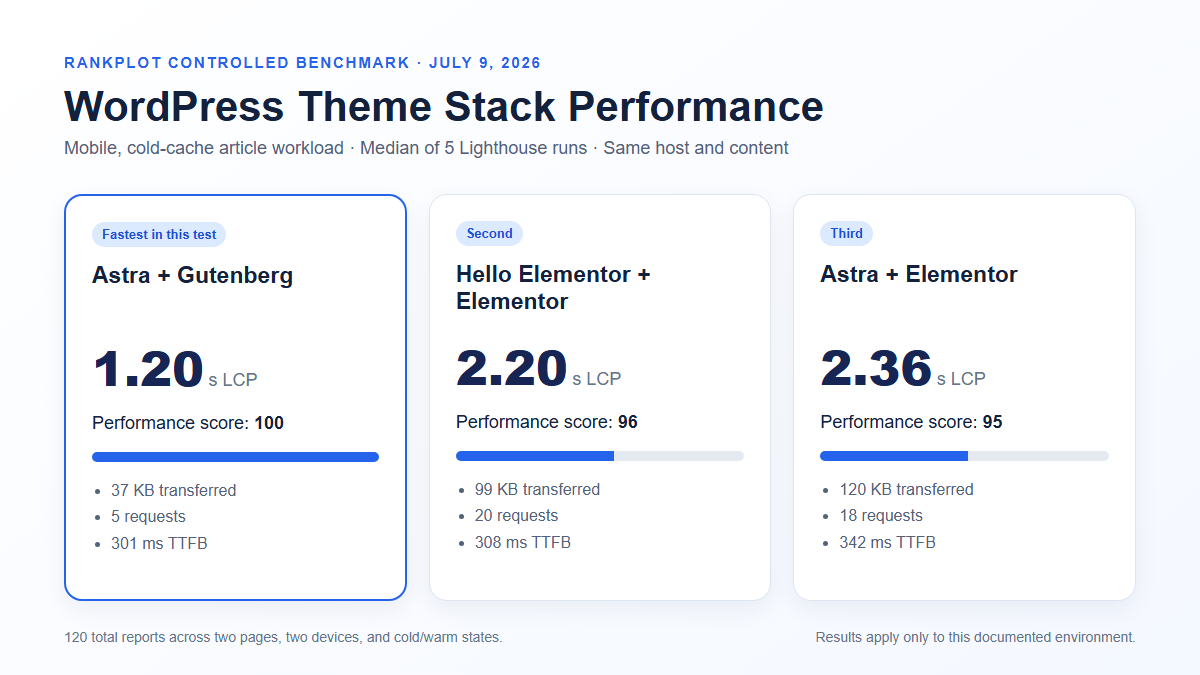
I’m going to give you numbers for four real configurations because the single-number benchmarks most reviews publish are almost useless without context.
| Setup | Page Size | Requests | Load Time | Desktop Score | Mobile Score |
|---|---|---|---|---|---|
| Astra Free + Gutenberg | ~52KB | 9 | 0.9s | 98 | 85 |
| Astra Pro + Gutenberg | ~68KB | 11 | 1.1s | 96 | 83 |
| Astra Pro + Elementor | ~195KB | 22 | 1.6s | 88 | 76 |
| Astra Pro + Elementor + WooCommerce | ~240KB | 26 | 1.9s | 83 | 71 |
A few things I notice every time I look at this:
The free version with Gutenberg is genuinely fast. 52KB, nine requests, 0.9s. That’s not “fast for a WordPress theme” — that’s fast, period. The jump to Pro adds about 16KB, which is irrelevant in practice.
What kills the numbers is adding Elementor. Page weight triples. That’s not Astra doing anything wrong — it’s just what happens when you layer a page builder on top of any theme. If speed is your priority and you’re using Gutenberg (which I am), this shouldn’t bother you.
The WooCommerce + Elementor combination dropping to 83 desktop is the number I’d watch. Not catastrophic, but it’s real degradation. If you’re running a store, caching and image optimization matter more than your theme choice at that point.
For affiliate sites, slow loading has a direct revenue cost. A one-second LCP difference on mobile translates to roughly a 10% higher bounce rate. On a 30,000 visitor/month site at 65% mobile traffic, losing 10% of those visitors costs around $156/month at typical affiliate earnings rates. Astra Pro costs $5.75/month. That math is hard to argue with.
Free vs Pro: Where the Line Actually Is
This is what the review is really about, so I’m going to be specific.
The Feature Table
| Feature | Free | Pro | How much it matters |
|---|---|---|---|
| Core theme + basic Customizer | ✅ | ✅ | Essential |
| ~100 free starter templates | ✅ | ✅ | High |
| 140+ Pro starter templates | ❌ | ✅ | Medium |
| Basic header customization | ✅ limited | ✅ full | High |
| Drag-and-drop Header Builder | ❌ | ✅ | High |
| Sticky / transparent header | ❌ | ✅ | Medium |
| Mega Menu | ❌ | ✅ | Situational |
| Footer Builder | ❌ | ✅ | High |
| Blog archive layouts (grid, list, masonry) | ❌ | ✅ | High for content sites |
| Custom post card design | ❌ | ✅ | High for blogs |
| Site Builder — custom page layouts | ❌ | ✅ | High |
| Custom 404 and search pages | ❌ | ✅ | Medium |
| WooCommerce quick view | ❌ | ✅ | High for stores |
| WooCommerce off-canvas cart | ❌ | ✅ | High for stores |
| WooCommerce checkout customization | ❌ | ✅ | High for stores |
| Global color and font palette | limited | ✅ full | Medium |
| Responsive breakpoint control | basic | ✅ full | High |
| White label branding | ❌ | ✅ | Agency only |
| WPML / Polylang | ✅ | ✅ | Foreign trade essential |
The Six Walls I Hit on the Free Version
I didn’t upgrade because someone convinced me. I upgraded because the free version kept stopping me from doing normal things.
Wall 1 — The sticky header (week 2). My navigation disappeared when users scrolled down. I opened Customizer and searched for “sticky.” Nothing. You need Pro or a third-party plugin. I installed a plugin, it conflicted with something else, I spent 90 minutes fixing it. This was the moment I first considered paying.
Wall 2 — Blog archive layout (week 3). I wanted posts displayed in a three-column grid instead of a plain stacked list. The Customizer actually shows you the grid option — it’s just grayed out. That kind of teasing feels worse than the option not existing at all.
Wall 3 — Footer (week 4). The default Astra footer shows “Powered by Astra” in a single row. Changing that to a multi-column layout with different widget areas requires the Footer Builder — Pro only.
Wall 4 — Landing page without header (week 6). I needed a clean page for an affiliate offer, no navigation. Site Builder in Pro handles this in about two minutes. On Free, I spent an afternoon using a plugin workaround that broke the mobile layout.
Wall 5 — WooCommerce (week 8). A client wanted quick view on product listings. Astra Free doesn’t have it. Neither does it have an off-canvas cart, or meaningful product page layout controls. For a real WooCommerce store, Free isn’t a starting point — it’s a dead end.
Wall 6 — Post card design (week 10). On category archive pages, I wanted to show featured images at a different aspect ratio and hide the author. Advanced blog layouts are Pro-only.
When to Upgrade — A Simple Decision Path
textRunning a WooCommerce store?
→ Go straight to Pro. Free will frustrate you daily.
Need sticky header, custom footer, or mega menu?
→ Pro.
Affiliate or content blog where archive layout matters?
→ Pro.
Managing more than one site?
→ Pro at $69/year covers unlimited sites.
The per-site cost is effectively zero from site two onward.
Simple blog or portfolio, no layout customization?
→ Free is genuinely fine. Stay there until you outgrow it.
Pricing — What You’re Actually Looking At
| Plan | Annual Price | Sites | What’s In It | Right For |
|---|---|---|---|---|
| Astra Free | $0 | Unlimited | Core theme + ~100 templates | Simple blogs, first sites |
| Astra Pro | $69/yr | Unlimited | All Pro modules — Header/Footer Builder, Site Builder, WooCommerce Pro | Most site owners |
| Essential Toolkit | $119/yr | Unlimited | Pro + Spectra Pro + 240+ templates + Ultimate Addons for Elementor | Content teams, heavier builders |
| Business Toolkit | $159/yr | Unlimited | Essential + ZipWP AI + OttoKit automation + SureFeedback | Agencies, multi-site operators |
| Pro Lifetime | $227 one-time | Unlimited | Full Pro features, permanent updates | Long-term operators |
The unlimited sites clause on every paid plan is genuinely unusual. Most theme companies charge per site. Astra doesn’t. If you manage four sites and upgrade to Pro, you’re paying $17.25 per site per year. By site ten, the price is almost irrelevant.
The lifetime deal at $227 breaks even at 3.3 years against the annual plan. If you’re still building WordPress sites in 2030 — and you probably will be — it’s the better deal.
The Business Toolkit’s main addition over Essential is ZipWP: you describe your business in two sentences, and it generates a complete multi-page site in under 60 seconds. It’s not magic — you’ll still spend time refining — but it cuts the starting-from-scratch time significantly. Worth the extra $40/year if you’re building sites for clients regularly. Not worth it if you’re just running your own.
Starter Templates — The “240+” Number Is Misleading
I want to be upfront about this because the marketing oversells it.
Of the 240+ templates, roughly 100 are free and 140 require Pro. That split is fine. What’s not fine is that the builder breakdown is very uneven — Elementor has the most options by far, and Gutenberg users get somewhere around 60–70 total templates across both free and Pro tiers combined.
If you’re a Gutenberg user expecting 240 options, you’ll find about a third of that. The best-looking designs tend to be in the Elementor or Pro category. The free Gutenberg templates are functional, but they’re not the ones featured in screenshots on the Astra homepage.
That said, a good starter template does roughly 60% of the work. Even 60 solid Gutenberg options covers most site types — I’ve never actually exhausted what’s available for a client brief.
Who Should Use Each Version — Foreign Trade & Affiliate Perspective
| Site Type | Plan | Key features you need | Cost |
|---|---|---|---|
| B2B foreign trade product catalog | Pro | Custom layouts, WPML, sticky header | $69/yr |
| WooCommerce store (<100 products) | Essential Toolkit | Quick view, off-canvas cart, checkout control | $119/yr |
| Affiliate content blog | Free → Pro | Blog archive layouts, speed, post card design | $0 → $69/yr |
| Multiple niche sites (5+) | Business Toolkit | ZipWP + white label + OttoKit | $159/yr |
| Lead generation landing pages | Pro | Site Builder, headerless page templates | $69/yr |
| Agency building client sites | Business Toolkit | White label + ZipWP + unlimited sites | $159/yr |
One thing specific to foreign trade sites worth mentioning: Astra’s WPML compatibility is clean. I’ve run it on a Chinese-English bilingual product catalog and the header, footer, and layout elements switch correctly without the RTL or column-break issues I’ve hit with heavier themes. That’s not a given — some themes handle multilingual layouts badly, and Astra isn’t one of them.
What I Actually Don’t Like
The Customizer has too many options. When you first open Astra Pro, there are panels nested inside panels, and it’s not obvious what order to configure things in. I still occasionally find a setting I didn’t know existed after two years of using it.
The free template quality gap is real. The Pro templates look noticeably more modern and polished. Showing users the Pro designs while on Free feels a bit like a bait and switch, even if it’s technically just tiered marketing.
Gutenberg templates are undersupplied. 60–70 options sounds decent until you’re looking for a specific layout type and realizing the Elementor version has exactly what you want but the Gutenberg version doesn’t exist.
Support is inconsistent. Their documentation is genuinely good — most problems I’ve solved by reading it. But when I’ve opened support tickets, response times have ranged from a few hours to two days depending on when I submitted. Not terrible, but not premium-tier either.
Performance with Elementor drops more than I expected. I knew Elementor would add weight, but going from a 98 desktop score to 88 on the same content surprised me the first time. Worth knowing before you commit to that stack.
FAQ
Is the Astra free version actually worth using?
Yes, for simple sites. A blog, a portfolio, a five-page company site with a standard header — Free handles all of that well, and the performance is excellent. The moment you need layout control beyond the basics, you’ll feel the ceiling.
Is Astra Pro worth $69/year?
For most people building real sites: yes. Unlimited sites at that price makes the per-site cost trivial once you’re past the first one. The Header Builder and WooCommerce features alone justify it if those are relevant to your use case.
Does Astra work well with Gutenberg?
It’s actually the best combination for performance. 52KB, 0.9s load, 98 desktop score — those numbers beat most themes regardless of builder. If you’re already committed to Gutenberg, Astra Free is hard to beat at any price.
Bottom Line
I’ve been using Astra long enough to have a real opinion rather than a benchmarked one.
The free version is not a stripped-down demo. It’s a real theme that handles straightforward sites well. But its ceiling is lower than the marketing suggests, and you’ll find it within the first month of building anything that requires layout flexibility.
Pro at $69/year is one of the cleaner value propositions in WordPress. Not because it’s the cheapest, but because unlimited sites means the price doesn’t compound as your portfolio grows. One site, ten sites — same invoice.
Stay on Free if your site is a simple blog, portfolio, or brochure site with no WooCommerce and no real layout customization requirements.
Upgrade to Pro if you need sticky headers, custom blog layouts, WooCommerce functionality, custom landing pages, or you’re managing more than one site.