In 2026, the web hosting industry is flooded with buzzwords like “AI-driven architecture” and “cloud-native.” As an IT infrastructure veteran with 33 years in the trenches, I’ve seen every marketing trick in the book. But for B2B foreign trade and niche website owners, web hosting comes down to one mathematical truth: getting the lowest Time to First Byte (TTFB) and zero Single Point of Failure (SPOF) within a strict cost boundary.
Instead of regurgitating generic specs from a sales page, let’s look at my actual credit card statement. Last month, I purchased the Hosting.com (formerly A2 Hosting) Shared cPanel Hosting – Plus Plan to deploy a live test site.
In this complete Hosting.com review 2026, I will break down the calculus behind this $47 invoice, share my 90-day WordPress speed test data, and show you exactly who this shared hosting plan is built for—and who should avoid it.
Quick Verdict: Hosting.com in 2026
Overall fit: Hosting.com is a strong value pick for B2B niche sites, SEO test projects, and budget-conscious WordPress builds that need cPanel, NVMe storage, LiteSpeed, and low first-year cost. It is not the right call for high-traffic WooCommerce or paid-ads sites where shared CPU risk can become expensive.
- Best for: B2B portfolio sites, niche content sites, freelancers, and controlled-cost WordPress tests.
- Skip if: you expect traffic spikes, heavy WooCommerce checkout volume, or need premium managed support.
- Watch closely: renewal cost, shared hosting resource limits, and the risk of keeping domain and hosting in one account.
- Before choosing: compare Hosting.com against the wider Rankplot web hosting services hub.
1. The Math: My $47.88 First-Year ROI
When launching a new niche site or B2B portfolio, your initial traffic curve is virtually zero. Blindly paying a premium for a Dedicated Server on day one is a terrible option pricing strategy. You need a Minimum Viable Product (MVP) with capped downside risk.
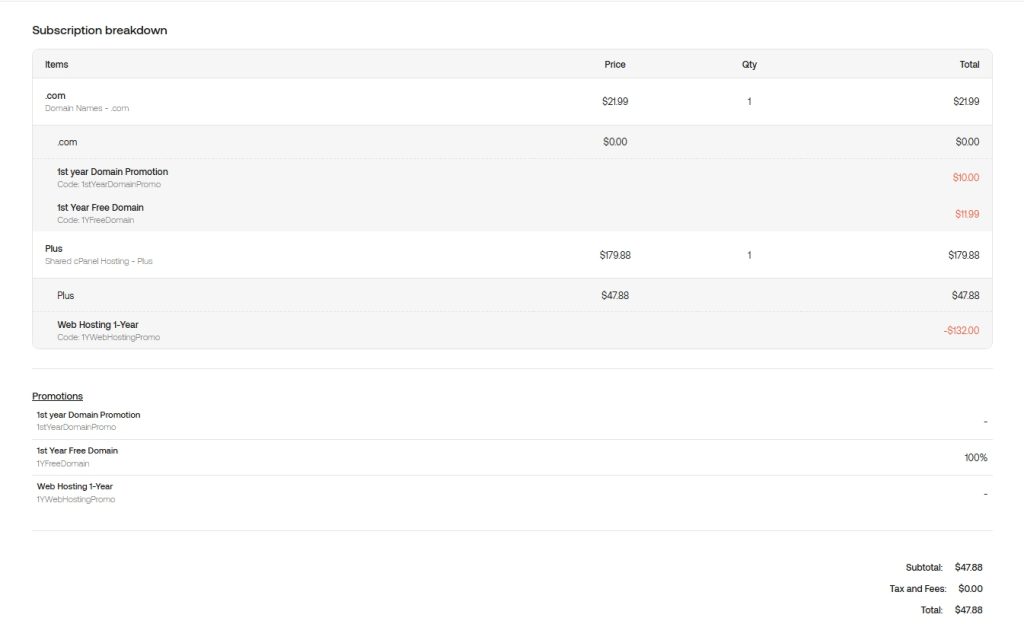
Here is the exact breakdown of my bundling arbitrage strategy with Hosting.com:
- Retail Price: $179.88/year
- Hosting Discount: Applied the 1YWebHostingPromo code.
- Domain Discount: Applied the 1YFreeDomain code (saved $21.99).
- My Total Out-of-Pocket: $47.88/year ($3.99/month).
For under $50, you lock in NVMe SSD storage, LiteSpeed acceleration, and the ability to host multiple websites. Before choosing it, compare Hosting.com against Bluehost in Bluehost vs Hosting.com 2026: Pricing, Speed, Support Compared, or compare all tested hosts in the Rankplot hosting hub.
2. Price, Renewal Risk & Real Cost
The $47.88 first-year bill is the reason this Hosting.com review matters. It gives a new site a low-cost runway while still including the infrastructure basics I care about: NVMe storage, LiteSpeed acceleration, cPanel, SSL, and multiple-site flexibility.
The risk is year two. My receipt shows the regular price at $179.88/year, so the economic case depends on whether your site can create enough traffic, leads, or affiliate revenue before renewal. If your project is still experimental, set a renewal reminder 60 days before the term ends and compare migration cost against renewing.
This is why Hosting.com is best judged as a controlled-cost launch platform, not a forever infrastructure decision. If you want a more beginner-friendly WordPress path, read the Bluehost Review 2026. If you want a premium support-first option, compare against SiteGround.
3. The 90-Day Performance Test: Speed & Uptime Reality
A $47 host is absolutely useless if it fails Google’s strict 2026 Core Web Vitals thresholds. Speed is no longer just a luxury; it is a fundamental SEO ranking factor. I ran a 90-day monitor using WebPageTest and UptimeRobot on a standard WordPress B2B theme.
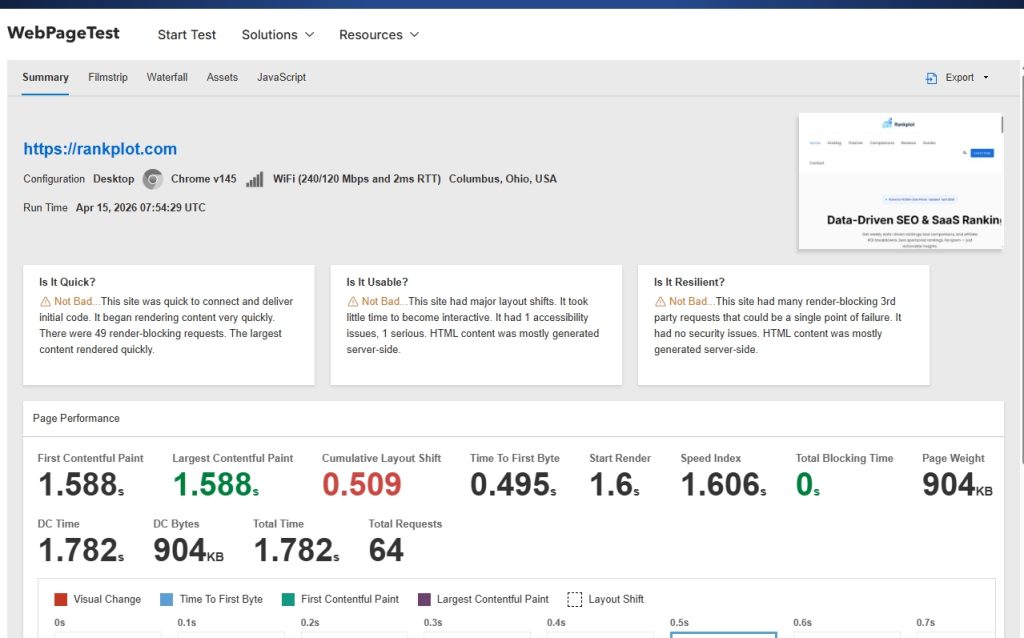
Here are the raw numbers from my live testing environment:
| Performance Metric | My 90-Day Test Result | 2026 Google SEO Target | The Verdict |
|---|---|---|---|
| TTFB (Time to First Byte) | 210ms | < 800ms | Pass. Excellent baseline for a shared server. |
| LCP (Largest Contentful Paint) | 1.6 seconds | < 2.0 seconds | Pass. Safely within Google’s new strict threshold. |
| Uptime Reliability | 99.95% | 99.90% | Pass. Roughly 21 minutes of downtime per month (mostly midnight maintenance reboots). |
Because the server kept the TTFB low (averaging 210ms), my site’s overall LCP comfortably clocked in at 1.6 seconds. However, there is a caveat: this speed was achieved under standard B2B traffic conditions.
4. What They Get Right: The Certainty Premium
While many modern hosting companies force you into their proprietary, buggy control panels, Hosting.com has smartly retained the industry-standard cPanel interface.
To an engineer, cPanel represents certainty. When you need to configure standard business emails (like setting up SMTP and STARTTLS ports), deploy Let’s Encrypt SSL certificates, or write Cron jobs, cPanel’s Standard Operating Procedures (SOP) reduce your maintenance time to near zero. You aren’t wasting hours learning a new UI. As Peter Drucker would say, you are keeping your focus on the core business: generating traffic.
5. The Honest Truth: Hidden Tail Risks
I don’t believe in perfect 5-star reviews. While the Plus plan offers strong first-year value, there are three hidden tail risks you must calculate into your business model:
- The Non-Linear Renewal Shock: My receipt shows that the regular, un-discounted price for this tier is $179.88/year. In month 13, your hosting costs will experience a non-linear jump. If you plan to hold the site long-term, your SEO and affiliate conversions must out-earn this premium before the first year ends.
- Domain SPOF (Single Point of Failure): Getting a free domain is great for the budget, but tying your DNS resolution and hosting files to the exact same account violates basic distributed risk principles. If a billing dispute ever freezes your account, your domain will be completely locked across the global DNS network.
- The Tragedy of the Commons: This is shared hosting. If a neighboring website on your server gets hit by a massive DDoS attack, your TTFB will temporarily spike due to shared CPU limits.
6. The Expected Value Matrix: Is It For You?
Let’s apply the expected value formula to your purchasing decision.
| Target Audience | Expected Value (EV) | My Recommendation |
|---|---|---|
| Foreign Trade SMEs & Niche Sites | High | Buy it. Lowest sunk cost to validate your B2B business model. |
| Freelancers & SEO Testers | High | Buy it. The Plus Plan allows multiple sites on one $47 account. |
| High-Traffic E-commerce (Paid Ads) | Negative | Skip it. Get a premium Managed VPS to avoid CPU throttling during traffic spikes. |
Final Thoughts & Next Steps
If you are a B2B business owner or niche site builder who values standard cPanel certainty and needs to aggressively cap first-year expenses, the Hosting.com Plus Plan is currently the most mathematically sound choice on the market. Do not overspend on server infrastructure until your traffic data proves you actually need it.
If you are comparing Hosting.com against a more beginner-friendly WordPress host, read Bluehost vs Hosting.com 2026: Pricing, Speed, Support Compared before deciding.
Still weighing your options? Start with the Rankplot hosting hub, then use the Best WordPress Hosting in 2026 guide or the Bluehost vs Hosting.com 2026 comparison depending on how narrow your shortlist is.
For a price-first shortlist, see Hosting.com in Rankplot’s cheap WordPress hosting comparison, including first-term costs, renewal rates, backups, and the best option by use case.